TPM PCR Validation Error causing BitLocker Recovery at Boot
Summary: This article provides information about Trusted Platform Module (TPM) Platform Configuration Register (PCR) Validation Error causing BitLocker Recovery at Boot.
Symptoms
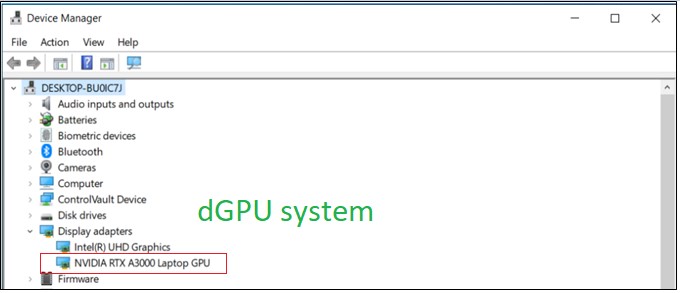
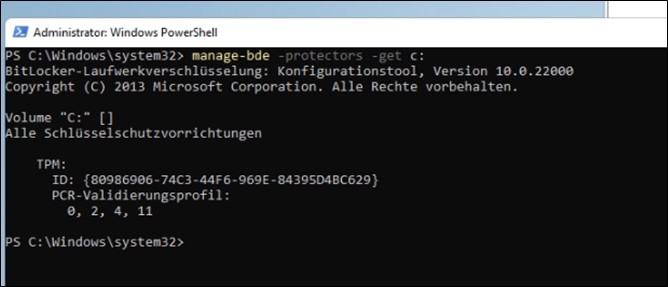
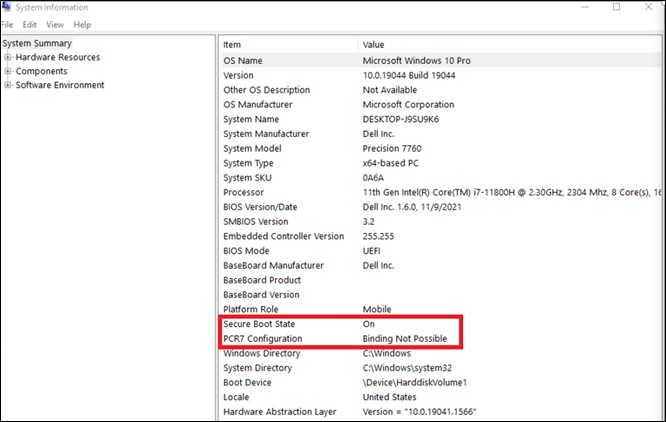
GFX card computer does NOT use PCR7 binding and show as Binding not possible (0, 2, 4, 11).
Test Step:
- Boot to Set up
- Enable Secure Boot
- Enable TPM
- Boot to the operating system
- Press Win + R "Cmd" run as administrator.
- Input Command "manage-bde-protectors-get c:"
Cause
The dGPU (expandable cards) and its OROM/UEFI driver must be signed and measured through TPM PCR7. BIOS 1.6.0 to address the Security Vulnerability by implementing the security mechanism that follows TCG and MSFT’s requirement.
From the TCG side:
https://trustedcomputinggroup.org/wp-content/uploads/TCG_PCClient_PFP_r1p05_v23_pub.pdf

From the Operating System side:
In Microsoft’s own documentation on BitLocker Drive Encryption
BitLocker drive encryption in Windows 10 for OEMs
If the presence of expandable cards (Ex: GFX card) results in OROM UEFI drivers loaded by UEFI BIOS during boot, then BitLocker does NOT use PCR7 binding.
Resolution
According to Microsoft information, it is expected behavior, with no recovery plan.