Dell Service Coverage for Laptop Keyboards
Summary: This article clarifies the conditions for Dell coverage of the laptop keyboards (Worldwide). Contractual and legal warranties in the European Union (EU), the Dell Limited Hardware Warranty (United States and Canada), and or applicable Dell Support Service Agreements are covered in this document. ...
Instructions
Quick Answer
Dell laptop keyboard damage falls into two categories with two different coverage outcomes:
| Damage Type | Covered by Standard Warranty? | Covered by Accidental Damage? |
|---|---|---|
| Liquid spills | No | Yes1 |
| Keys mechanically popped off / separated from accidental impact | No | Yes1 |
| Keys stuck or not working (material/mechanical failure, non-customer-induced) | Yes, under standard warranty | N/A |
| Backlight malfunction (material failure, non-customer-induced) | Yes, under standard warranty | N/A |
| Customer-induced physical damage (general) | No | Yes1, only if Accidental Damage coverage applies |
| Cosmetic wear and tear (fading, shine, minor scratches, debris) | No | Not applicable (not damage) |
1Coverage requires an applicable Accidental Damage service entitlement or a support offering that includes accidental damage protection. Accidental Damage coverage is a separate, optional service and must be purchased at the time of the original computer purchase
Key takeaway: Cosmetic wear associated with normal use is never covered. Coverage for accidental physical or liquid damage requires an active Dell Accidental Damage service entitlement. Product failures caused by material or manufacturing defects remain covered under the applicable standard warranty. Desktop peripheral keyboards that are external and not integrated into the system are not eligible for Accidental Damage coverage.
Scope
This article applies worldwide and covers:
- The Dell Limited Hardware Warranty (United States and Canada)
- Contractual and legal warranties in the European Union (EU)
- Applicable Dell Support Service Agreements
It applies to built-in laptop/notebook keyboards on Dell portable computers. Affected products include: Chromebook, G Series, Alienware, Dell Plus, Dell Pro, Dell Pro Max, Dell Pro Plus, Dell Pro Premium, Inspiron, Latitude, Dell Pro Rugged, Vostro, XPS, Legacy Laptop Models, and Mobile Workstations.
Symptoms
Wear and Tear (Not Covered)
Dell keyboards can experience cosmetic wear and tear overtime from regular use. These issues do not affect keyboard functionality and are not covered under warranty or service agreements:
- Fading or worn lettering on keys.
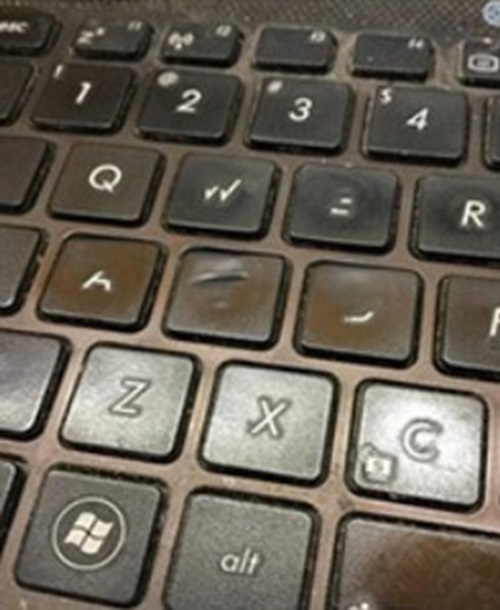
Figure 1: Faded or Worn Lettering on Keys
- Worn or shiny keys, where the key surface texture has smoothed out from repeated finger contact.
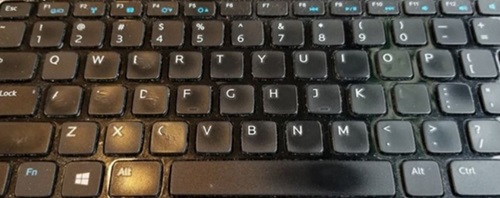
Figure 2: Worn or Shiny Keys
- Minor wear, scratches, or paint chipping on key edges.
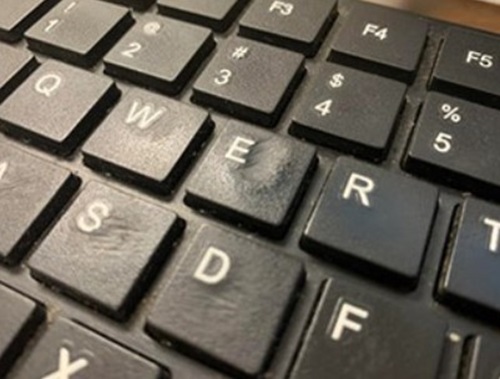
Figure 3: Keys with Minor Wear
Accidental Damage (Covered Only Under Dell Accidental Damage Coverage)
Keyboards are also subject to accidental damage during use. This is a distinct coverage category: Dell Accidental Damage Coverage is distinct from the standard warranty coverage and must be purchased along with the computer at the time of sale. Without Accidental Damage coverage, these issues are not covered.
- Liquid spilled on the keyboard.
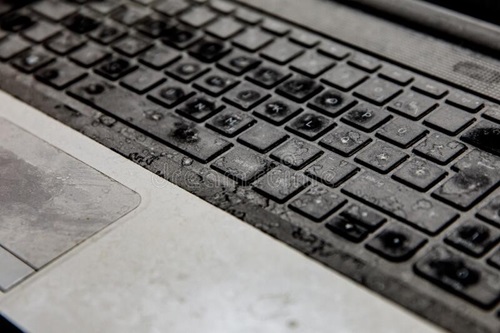
Figure 4: Liquid Spilled on the Keyboard
- A single key mechanically separated (popped off) from the keyboard due to accidental impact or force.
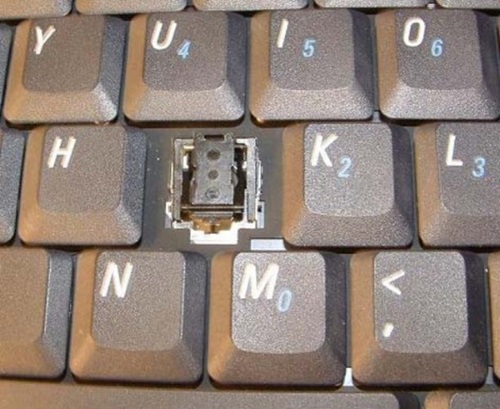
Figure 5: A Single Key Popped Off the Keyboard
- Multiple keys mechanically separated (popped off) from the keyboard due to accidental impact or force.
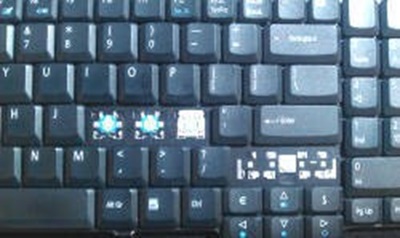
Figure 6: Multiple Keys Popped Off the Keyboard
Cause
No specific root-cause information is documented for this article. The distinction Dell draws is based on damage origin (normal use vs. accident vs. manufacturing/material defect), not on a technical failure mechanism.
Resolution
Material Failure (Covered Under Standard Warranty)
The following are treated as material/manufacturing failures and are covered under the standard Dell Limited Hardware Warranty or applicable Support Service Agreement, provided the damage is not customer-induced:
- Specific keys stop working or become stuck (mechanical/electrical failure, not physical damage).
- The keyboard backlight malfunctions or stops working.
Frequently Asked Questions: Dell Keyboard Coverage
Q: What types of keyboard issues are covered under the standard Dell warranty?
A: The following are treated as material/manufacturing failures and are covered under the standard Dell Limited Hardware Warranty or applicable Support Service Agreement, provided the damage is not customer-induced:
- Specific keys stop working or become stuck (mechanical/electrical failure, not physical damage).
- The keyboard backlight malfunctions or stops working.
Q: How do I determine what type of coverage applies to my keyboard issue?
A: Use this logic:
- Is the issue purely cosmetic (fading, shine, minor scratches) with no functional impact? > Not covered under any plan.
- Was the keyboard damaged by an accident (liquid spill, impact, force)? > Covered only if the system has Dell Accidental Damage coverage (when purchased simultaneously with the computer.). Not covered otherwise.
- Did a key or the backlight stop working with no physical/liquid damage present? > Covered under the standard Dell Limited Hardware Warranty or Support Service Agreement, as a material failure.
- Is the keyboard a desktop peripheral (external) keyboard? > Not eligible for Accidental Damage coverage regardless of the above.
Q: Will Dell replace my keyboard if the letters have worn off the keys?
A: No. Faded or worn lettering is classified as cosmetic wear and tear and is not covered under warranty or service agreements.
Q: I spilled coffee on my laptop keyboard. Is this covered?
A: Only if your system has Dell Accidental Damage coverage. Accidental Damage coverage is a separate, optional coverage that must be purchased at the same time as the computer. Without it, liquid spill damage is not covered.
Q: A key popped off my laptop. Will Dell fix this for free?
A: Only if you have Dell Accidental Damage coverage. A popped-off key from an accident (drop, impact, force) is treated as accidental damage, not a material defect.
Q: My spacebar stopped working but nothing was spilled or dropped on it. Is this covered?
A: Yes, typically. A key that stops working or sticks without evidence of physical/liquid damage is treated as a material failure and is covered under the standard Dell Limited Hardware Warranty or Support Service Agreement.
Q: My keyboard backlight stopped working. Is this covered?
A: Yes, if it is a malfunction and not the result of physical/liquid damage — this is treated as a material failure covered under the standard warranty.
Q: Does Accidental Damage coverage apply to my external USB keyboard?
A: No. Desktop peripheral (external) keyboards are not eligible for Accidental Damage coverage.
Q: Do I need to buy Accidental Damage coverage separately?
A: Accidental Damage coverage must be purchased at the same time as the computer.
Additional Information
- Keyboard Troubleshooting and Usage: The Definitive Guide
- How to Avoid Accidental Damage on your Dell Computer (Video)
- Check Support Status / Support Services — verify what coverage is currently active on a specific service tag.