Windows 11 - Incorrect Operating System Version Reported
Resumen: This article talks about an issue where specific applications and computer settings on Windows 11 detects the Operating System as Windows 10.
Este artículo se aplica a
Este artículo no se aplica a
Este artículo no está vinculado a ningún producto específico.
No se identifican todas las versiones del producto en este artículo.
Síntomas
In multiple applications and computer settings, Windows 11 identifies as Windows 10 to prevent application incompatibilities.
System settings that identify as Windows 10
- Microsoft Edge and other Chromium-based browsers such as Google Chrome Browser, Brave, and so on show Windows 10 in the user agent string.
- Mozilla/5.0 (Windows NT 10.0; Win64; x64) AppleWebKit/537.36 (KHTML, like Gecko) Chrome/95.0.4638.69 Safari/537.36
- Websites that use the user agent string to identify the actual Windows version for digital content such as driver downloads and self-help may direct to incorrect content.
- Windows Command Prompt identifies as Version 10.

- Microsoft Account Device properties.

- System Configuration (MSCONFIG).
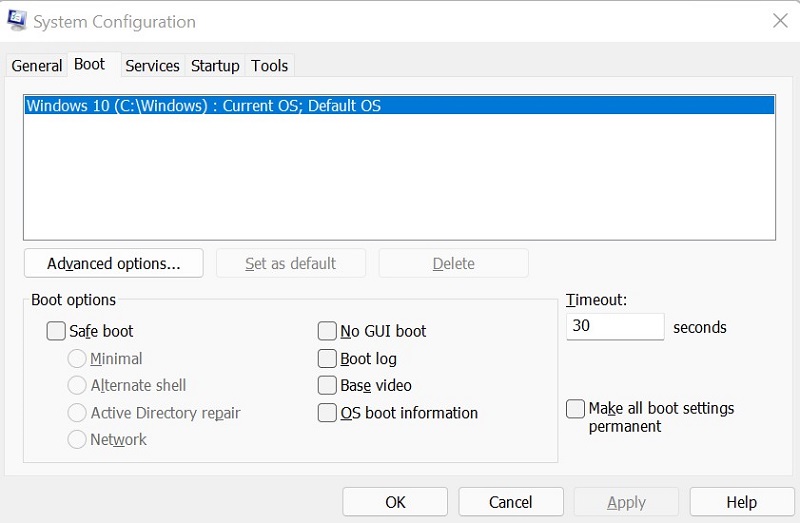
Causa
Windows uses the internal build number (as shown in Figure 4 [English only]) to differentiate between Windows 11 (Build 22000 and higher) and Windows 10 (Build below 22000).

Resolución
To correctly identify the windows version on your computer, use Winver. For instructions, see Microsoft knowledge-base article: Which version of Windows operating system am I running
Productos afectados
Alienware, Inspiron, OptiPlex, Vostro, XPS, G Series, G Series, Alienware, Inspiron, Latitude, Vostro, XPS, Fixed Workstations, Mobile WorkstationsPropiedades del artículo
Número del artículo: 000193571
Tipo de artículo: Solution
Última modificación: 19 Apr 2025
Versión: 6
Encuentre respuestas a sus preguntas de otros usuarios de Dell
Servicios de soporte
Compruebe si el dispositivo está cubierto por los servicios de soporte.