Intermittent Critical Error Reported on Computers Using an SSSTC CA6 SSD
Summary: The following article provides information about a solid state drive (SSD) related error on your Dell computer. It is specific to the Solid-State Storage Technology Corporation (SSSTC) CA6 series of SSD. ...
Αυτό το άρθρο ισχύει για
Αυτό το άρθρο δεν ισχύει για
Αυτό το άρθρο δεν συνδέεται με κάποιο συγκεκριμένο προϊόν.
Δεν προσδιορίζονται όλες οι εκδόσεις προϊόντων σε αυτό το άρθρο.
Symptoms
Intermittent CRITICAL_PROCESS_DIED Errors
Owners of Dell computers using an SSSTC CA6 SSD may encounter the following intermittent error:
Windows critical error code: CRITICAL_PROCESS_DIED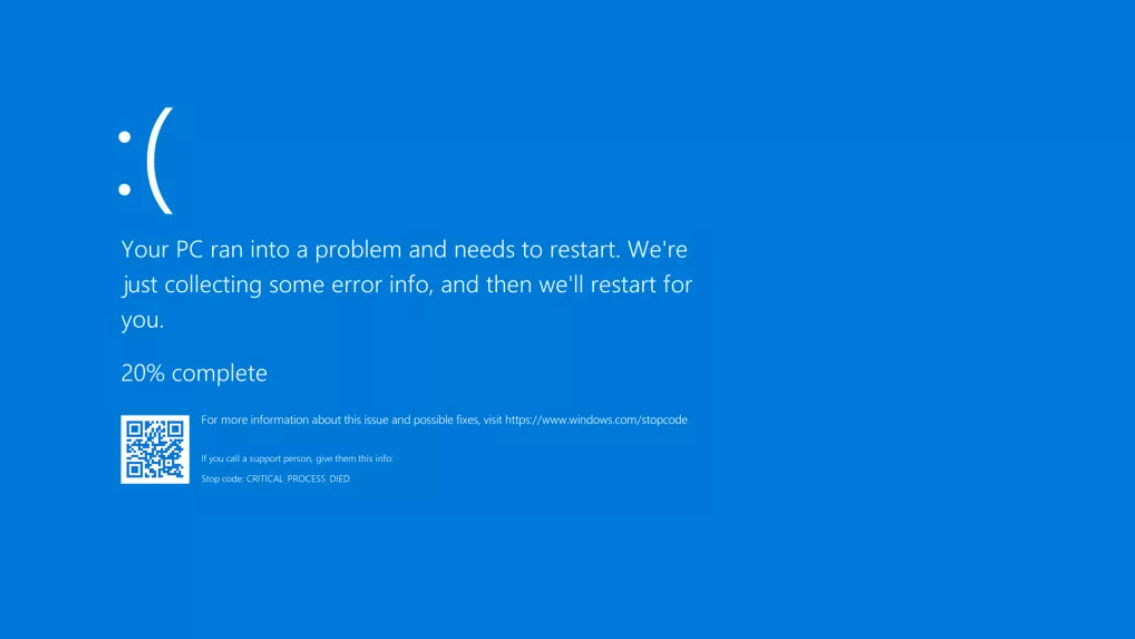
The computer may intermittently stop responding and display the error on-screen before restarting. This is being reported on Dell products with an SSSTC CA6 SSD installed.
Rebooting the computer can return it to normal operation for a time.
Cause
The Dell Engineering team identified an SSD firmware error with those drives.
Resolution
Update the storage firmware update to SSSTC Solid State Drive Firmware Update for CA6-8D512-Q11, CA6-8D1024-Q11, CA6-8D2048-Q11, version 2420.1114 or later. To download and install the SSSTC-Solid-State-Drive-Firmware-Update-for-CA6-8D512-Q11-CA6-8D1024-Q11-CA6-8D2048-Q11_9HYX9_WIN_2420.1114_A00_01.exe see:
- Dell Knowledge Base Article: How to Download and Install Dell Drivers
Επηρεαζόμενα προϊόντα
Alienware x15 R1, Alienware x15 R2, Alienware x17 R1, Alienware x17 R2, Precision 5560, Precision 7560, Precision 7760Ιδιότητες άρθρου
Article Number: 000197313
Article Type: Solution
Τελευταία τροποποίηση: 13 Μαΐ 2026
Version: 5
Βρείτε απαντήσεις στις ερωτήσεις σας από άλλους χρήστες της Dell
Υπηρεσίες υποστήριξης
Ελέγξτε αν η συσκευή σας καλύπτεται από τις Υπηρεσίες υποστήριξης.