

Unsolved
1 Rookie
•
6 Posts
•
2 Points
0
178
January 20th, 2025 09:53
P3424WEB, Presence Sensor doesn't work on non-Dell
Hello, I have Dell monitor P3424WEB. Its integrated camera module has Presence Sensor module, but it doesn't work with my computer. I have custom build desktop PC with an ASUS motherboard with Windows 11 Pro 24H2. The monitor and desktop PC are connected via DisplayPort for video and a USB-B(monitor)-USB-A(PC) cabel for upstream connection. Everything works except Presence Sensor. Presence Sensor doesn't show up in Dell Peripheral Manager (version 1.7.7), nor Windows 11 settings. I have already tried connecting this monitor to my HP laptop, but the result is the same.
On the Internet, I found the following web camera FAQs in the older official Dell Peripheral Manager User's Guide (2021 - 06 Rev. A06):
Question: Why does DPM does not show Presence Detection features?
Possible causes: Please note that this feature is only supported on Dell systems. Check that your system BIOS and
drivers are updated to the latest versions from Dell Support site.
Is it really true that Presence Sensor on my monitor works only with Dell computers? If so, why?
romanjudl
1 Rookie
•
6 Posts
•
2 Points
0
February 20th, 2025 13:38
Hello. Today I installed the latest Dell Display and Peripheral Manager v2.0.0.72 for Windows on my desktop PC, hoping that it would allow me to use the Presence Sensor module on the monitor's integrated camera. Unfortunately it didn't. I also updated firmware of my monitor to version M2T104. Is it possible that Dell could enable Presence Sensor on other manufacturers' computers as well? Many monitors from other brands have Presence Sensor that works across different brands of computers (laptops or desktops).
DELL-Chris M
Community Manager
•
56.9K Posts
•
232.1K Points
0
February 20th, 2025 14:03
That would have been a decision made by the Dell Display team and the Dell platform team. We cannot know why they decided this.
(edited)
romanjudl
1 Rookie
•
6 Posts
•
2 Points
0
February 24th, 2025 08:47
@DELL-Chris M Thank you for your reply. Is it possible to contact the Dell Display team and the Dell platform team to send them a feedback?
DELL-Chris M
Community Manager
•
56.9K Posts
•
232.1K Points
1
February 24th, 2025 12:50
They are aware of this thread.
krishal99
1 Rookie
•
6 Posts
•
2 Points
0
April 9th, 2026 17:56
I would like to add to this thread - I just bought the Dell 32 Plus 4k QD OLED monitor, which has this camera as well, and cannot use this feature. I do not see why it would not be available on non Dell workstations, the hardware is there. Please consider enabling this, or direct me to a contact who may be able to push this through, as even though this monitor is an excellent product, not having all the features is kind of a bummer
(edited)
DELL-ChrisM2
Community Manager
•
1.5K Posts
•
6.2K Points
0
April 9th, 2026 18:09
@krishal99 What version of DDPM did you test?
krishal99
1 Rookie
•
6 Posts
•
2 Points
0
April 9th, 2026 18:12
@DELL-ChrisM2 Hi fellow Chris! ;)
I am using 2.2.1.16, on a non-Dell device. Mind you, I did have another look at the manual for this monitor S3225QC, and nowhere does it mention that it would have presence detection. This camera seems to be only for the Spatial Audio... I imagine if the hardware is there, it should be considered a feature to be added in the future with firmware update, as it would greatly help preserve the life of this QD-OLED panel :)
Unless of course it would be expected to work on a Dell PC as it is, in which case my disappointment stands :P
DELL-ChrisM2
Community Manager
•
1.5K Posts
•
6.2K Points
0
April 9th, 2026 21:50
@krishal99
The two models have different camera hardware.

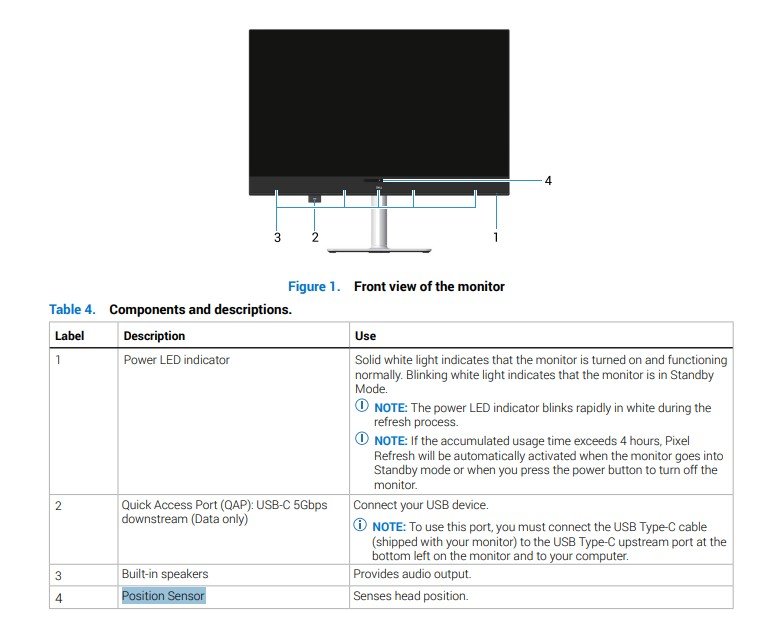
The P3424WEB User's Guide shows us that it has built-in Presence Sensor in its hardware and Menu OSD. This is used in conjunction with its built-in video conferencing webcam.
The S3225QC does not feature a built-in webcam. Correct, the S3225QC User's Guide never mentions Presence Sensor. So it is not a function of the S3225QC. The S3225QC simply has the front position sensor which is standalone and not part of the DDPM software.
(edited)
romanjudl
1 Rookie
•
6 Posts
•
2 Points
0
April 10th, 2026 09:55
Hello, I am following up on my inquiry from a year ago regarding the Presence Sensor on the Dell P3424WEB monitor (firmware M2T108).
My monitor is still paired with a non-Dell desktop (ASUS motherboard), and the Presence Sensor remains essentially a 'dead' piece of hardware. With the release of the lastest Windows 11 and the broader native support for 'Microsoft Presence Sensing', the question arises:
Is the Dell Display and Platform team finally considering releasing drivers that would allow this standard sensor to communicate with non-Dell PCs? Or is this hardware limitation still strictly enforced as a closed ecosystem benefit?
It seems unfortunate that a premium feature of this monitor remains locked for users who choose a custom PC build. Is there any update or a planned firmware/software release (DDPM) that addresses this?
DELL-ChrisM2
Community Manager
•
1.5K Posts
•
6.2K Points
0
April 10th, 2026 16:41
@romanjudl
Is the Dell Display and Platform team finally considering releasing drivers that would allow this standard sensor to communicate with non-Dell PCs?
I have not seen any communications from the DDPM team stating this. Have you tested the newer versions of DDPM since 2.0.0.72 to see if the same issue still happens?
romanjudl
1 Rookie
•
6 Posts
•
2 Points
0
April 10th, 2026 19:57
@DELL-ChrisM2 Thank you for the suggestion. I am currently using the latest version of Dell Display and Peripheral Manager (DDPM v 2.2.1.16).
To be precise: The software itself installs and runs correctly on my ASUS-based PC, allowing me to manage monitor settings. However, the Presence Sensing tab and its associated features (Wake on Approach / Walk Away Lock) simply do not appear in the camera menu at all. I also don't have 'Presence Sensing' options in Windows 11 settings.
This points back to the original issue: the sensor seems to require a specific Dell system driver or BIOS handshake that is unavailable for custom-built PCs.
Could you please check with the engineering team if there is a plan to release a standalone driver or a firmware update that exposes the Presence Sensor as a standard HID for Windows 11 'Presence Sensing' on non-Dell hardware?