Dell Pro Max Laptops Network State Incorrect if Wireless Radio Control Enabled in BIOS
Sammanfattning: The following article provides information about a network state issue on Dell Pro Max 16 MC16250 laptops. The wrong network state displays if Wireless Radio Control (WRC) is enabled in the laptops BIOS. ...
Den här artikeln gäller för
Den här artikeln gäller inte för
Den här artikeln är inte kopplad till någon specifik produkt.
Alla produktversioner identifieras inte i den här artikeln.
Symptom
Windows 11 does not display the correct network status after resuming from Modern Standby
Your Local Area Network (LAN) network status does not report the correct connection state if you enable WRC on your Dell Pro Max 16 MC16250 laptop.
Obs! The default WRC setting in the BIOS is Disabled.
Vad är WRC?
If enabled this feature will sense the connection of the system to a wired network and subsequently disable the selected wireless radios
(Wireless Local Area Network (WLAN) and/or Wireless Wide Area Network (WWAN)).
Upon disconnection from the wired network, the selected wireless radios will be re-enabled.
The problem occurs under either of the following circumstances:
-
You remove the RJ45 Ethernet cable from your Dell Thunderbolt WD24TB4 dock while it is in modern standby. Resuming from modern standby the wireless status is still disabled. The wireless status is unavailable, with auto-switching that wireless status should change to show it is enabled.
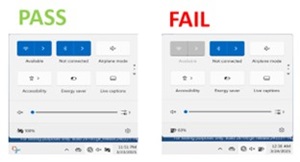
-
You plug in the RJ45 Ethernet cable to your Dell Thunderbolt WD24TB4 dock while it is in modern standby. Resuming from modern standby the wireless status is still enabled. The wireless status is unavailable, with Auto-switching the wireless status should change to show it is disabled.
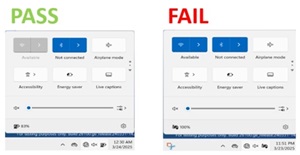
Orsak
This is due to the Embedded Controller (EC) on the dock:
- It clears the interrupt register for LAN Cable Remove. The Dock fails to notify the laptop that the LAN cable was removed.
- It does not clear the interrupt register for LAN Cable Added. The Dock fails to notify the laptop that the LAN cable was plugged in.
Upplösning
Obs! You must have administrator rights on your laptop to make any operating system changes or update any software.
Any of the following three options recovers the correct network status on your laptop:
- Re-plug the RJ45 Ethernet cable to your dock.
- Re-plug the docking cable to your laptop.
- Return the WRC option to its default disabled state in your BIOS.
A firmware update is planned for release in July 2025.
Berörda produkter
Dell Pro Max 16 MC16250Artikelegenskaper
Artikelnummer: 000305447
Artikeltyp: Solution
Senast ändrad: 22 maj 2026
Version: 3
Få svar på dina frågor från andra Dell-användare
Supporttjänster
Kontrollera om din enhet omfattas av supporttjänster.