PXE Boot DHCP Server Requirements for Dell Client Computers Shipping after 2019
Sammanfattning: Learn more about reports of a Preboot Execution Environment (PXE) boot issue on the latest computers from Dell. It is an issue where the Dynamic Host Configuration Protocol (DHCP) server is sending out the older undionly.kpxe file. New computers no longer support legacy boot. This file can prevent the server from accessing the Internet Protocol (IP) address of the new Dell XPS, Latitude, OptiPlex, or Precision device. ...
Den här artikeln gäller för
Den här artikeln gäller inte för
Den här artikeln är inte kopplad till någon specifik produkt.
Alla produktversioner identifieras inte i den här artikeln.
Symptom
New Dell computers with no legacy boot option may fail to PXE boot
Dell XPS, Latitude, OptiPlex, and Precision computers may experience a failure to boot PXE. This may be due to configuring the DHCP server for legacy support instead of the Unified Extensible Firmware Interface (UEFI). Using the traditional Legacy PXE boot:- The DHCP server offers the client computer
undionly.kpxe. - In return the computer accepts it, gains an IP address, and the PXE boot begins.
- However, the DHCP server must offer an
.efifile when UEFI is the only boot option available.
Orsak
This is because all Dell business computers built and shipped after 2019 offer only UEFI boot support.
Note: These computers are working as designed. UEFI has become the new standard, and Dell does not support legacy boot for PXE on our new computers moving forwards.
Upplösning
- Windows - The
wdsmgfw.efifile should be offered instead ofundionly.kpxe. - Linux - The
ipxe.efifile should be offered instead ofundionly.kpxe.
On most DHCP servers, the need for the server to distinguish between the UEFI and legacy can be eliminated by doing the following:
-
Configure the Internet Protocol-helpers (IP-helpers) to forward the DHCP requests to all the DHCP and Windows Deployment Services (WDS) or PXE hosts.
-
Remove any option 66 and option 67 definitions on the DHCP servers.
-
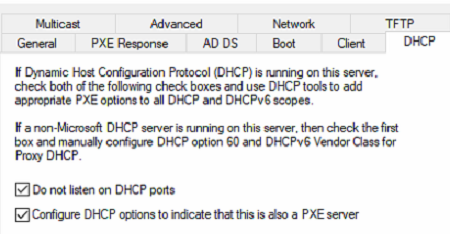
If WDS runs on the same server as your DHCP:
-
Mark the checkbox in WDS to not use DHCP port.
-
Mark the checkbox to set the PXE Client DHCP option.
-
Berörda produkter
OptiPlex, XPS, Latitude, XPS, Fixed Workstations, Mobile Workstations, Latitude 7200 2-in-1, Latitude 3300, Latitude 5300 2-in-1, Latitude 5300, Latitude 7300, Latitude 3400, Latitude 5400, Latitude 5401, Latitude 7400 2-in-1, Latitude 7400
, Latitude 3500, Latitude 5500, Latitude 5501
...
Artikelegenskaper
Artikelnummer: 000124383
Artikeltyp: Solution
Senast ändrad: 20 apr. 2026
Version: 12
Få svar på dina frågor från andra Dell-användare
Supporttjänster
Kontrollera om din enhet omfattas av supporttjänster.