PowerProtect : Échec de la restauration en mode fichier de la machine virtuelle PPDM avec ARV0039 à l’aide du compte d’utilisateur Sudo
Résumé: FlR de PowerProtect Data Manager (PPDM) à l’aide du compte utilisateur Sudo. La restauration en mode fichier échoue avec ARV0039 et ne monte pas de disques
Cet article concerne
Cet article ne concerne pas
Cet article n’est associé à aucun produit spécifique.
Toutes les versions du produit ne sont pas identifiées dans cet article.
Symptômes
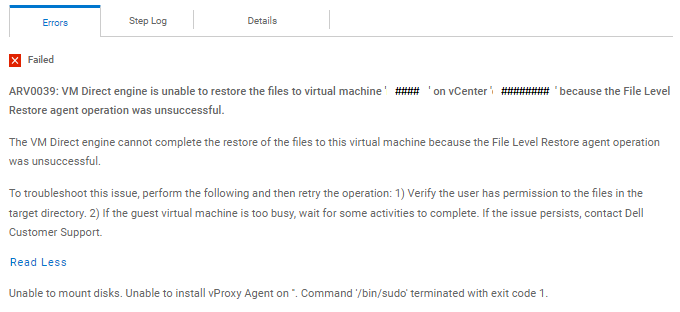
ERREUR:
PowerProtect Data Manager_####.log:
Vproxyd_####.log:
PowerProtect Data Manager_####.log:
{
  "status" : "FAILED",
  "summaries" : [ "Unmount complete" ],
  "error" : {
    "code" : "ARV0039",
    "reason" : "VM Direct engine is unable to restore the files to virtual machine 'target_VMname' on vCenter 'myvCenter' because the File Level Restore agent operation was unsuccessful.",
    "detailedDescription" : "The VM Direct engine cannot complete the restore of the files to this virtual machine because the File Level Restore agent operation was unsuccessful.",
    "remediation" : "To troubleshoot this issue, perform the following and then retry the operation: 1) Verify the user has permission to the files in the target directory. 2) If the guest virtual machine is too busy, wait for some activities to complete. If the issue persists, contact Dell Customer Support.",
    "extendedReason" : "Unable to mount disks.  Unable to install vProxy Agent on ''.  Command '/bin/sudo' terminated with exit code 1.",
    "messageID" : "ARV0039",
    "arguments" : [ {
      "name" : "vCenterName",
      "value" : "myvCenter"
    }, {
      "name" : "vmName",
      "value" : "target_VMname"
    } ]
  },
  "bytesTransferred" : null
}
Vproxyd_####.log:
mount-####.log: YYYY-MM-DDTHH:MM:47.147Z ERROR:  [####;####] Unable to install vProxy Agent on ''.  Command '/bin/sudo' terminated with exit code 1.
mount-####.log: YYYY-MM-DDTHH:MM:47.147Z TRACE:  [####;####] Disconnecting from vProxy Agent on VM 'target_VMname' (vm-####) ...
mount-####.log: YYYY-MM-DDTHH:MM:47.147Z INFO:   [####;####] vim: Disconnected from session on vCenter 'my_vCenter'.
mount-####.log: YYYY-MM-DDTHH:MM:47.147Z INFO:   [####;####] Disconnected from vProxy Agent on VM 'target_VMname' (vm-####).
mount-####.log: YYYY-MM-DDTHH:MM:47.147Z INFO:   [####;####] Host agent lock released.
mount-####.log: YYYY-MM-DDTHH:MM:47.147Z INFO:   [####;####] Step 'Verifying agent readiness' done: Failed
mount-####.log: YYYY-MM-DDTHH:MM:47.148Z INFO:   [####;####] Unmounting after mount unsuccessful: Unable to install vProxy Agent on ''.  Command '/bin/sudo' terminated with exit code 1..
mount-####.log: YYYY-MM-DDTHH:MM:47.149Z TRACE:  [####;####] Entering doUnmount.
mount-####.log: YYYY-MM-DDTHH:MM:47.152Z INFO:   [####;####] Unlocking VM
mount-####.log: YYYY-MM-DDTHH:MM:47.156Z TRACE:  [####;####] Searching for virtual machine with MORef 'vm-####' ...
mount-####.log: YYYY-MM-DDTHH:MM:47.163Z INFO:   [####;####] Found virtual machine 'target_VMname' with MORef 'vm-####'.
mount-####.log: YYYY-MM-DDTHH:MM:47.163Z TRACE:  [####;####] Unlocking VM ...
mount-####.log: YYYY-MM-DDTHH:MM:47.168Z TRACE:  [####;####] Attempting to clear virtual machine's lock tag 'Dell VM Direct Engine Session' ...
mount-####.log: YYYY-MM-DDTHH:MM:47.168Z TRACE:  [####;####] Setting custom attribute 'Dell VM Direct Engine Session' value for object vm-#### to '' ...
mount-####.log: YYYY-MM-DDTHH:MM:47.173Z INFO:   [####;####] Set custom attribute 'Dell VM Direct Engine Session' value for object vm-#### to ''.
mount-####.log: YYYY-MM-DDTHH:MM:47.173Z INFO:   [####;####] Unlocked virtual machine.
mount-####.log: YYYY-MM-DDTHH:MM:47.173Z TRACE:  [####;####] Unmount complete
mount-####.log: YYYY-MM-DDTHH:MM:47.174Z INFO:   [####;####] Finalized steps: [
mount-####.log: YYYY-MM-DDTHH:MM:47.174Z INFO:   [####;####]     {
mount-####.log: YYYY-MM-DDTHH:MM:47.174Z INFO:   [####;####]         "Name": "Verifying connectivity",
mount-####.log: YYYY-MM-DDTHH:MM:47.174Z INFO:   [####;####]         "Status": "Success",
mount-####.log: YYYY-MM-DDTHH:MM:47.174Z INFO:   [####;####]         "Description": "",
mount-####.log: YYYY-MM-DDTHH:MM:47.174Z INFO:   [####;####]         "StartTime": "YYYY-MM-DDT15:28:30.042313669-04:00",
mount-####.log: YYYY-MM-DDTHH:MM:47.174Z INFO:   [####;####]         "DurationInMillis": 1516
mount-####.log: YYYY-MM-DDTHH:MM:47.174Z INFO:   [####;####]     },
mount-####.log: YYYY-MM-DDTHH:MM:47.174Z INFO:   [####;####]     {
mount-####.log: YYYY-MM-DDTHH:MM:47.174Z INFO:   [####;####]         "Name": "Verifying agent readiness",
mount-####.log: YYYY-MM-DDTHH:MM:47.174Z INFO:   [####;####]         "Status": "Failed",
mount-####.log: YYYY-MM-DDTHH:MM:47.174Z INFO:   [####;####]         "Description": "",
mount-####.log: YYYY-MM-DDTHH:MM:47.174Z INFO:   [####;####]         "StartTime": "YYYY-MM-DDT15:28:31.559661415-04:00",
mount-####.log: YYYY-MM-DDTHH:MM:47.174Z INFO:   [####;####]         "DurationInMillis": 15588
mount-####.log: YYYY-MM-DDTHH:MM:47.174Z INFO:   [####;####]     },
mount-####.log: YYYY-MM-DDTHH:MM:47.174Z INFO:   [####;####]     {
mount-####.log: YYYY-MM-DDTHH:MM:47.174Z INFO:   [####;####]         "Name": "Creating datastore",
mount-####.log: YYYY-MM-DDTHH:MM:47.174Z INFO:   [####;####]         "Status": "Canceled",
mount-####.log: YYYY-MM-DDTHH:MM:47.174Z INFO:   [####;####]         "Description": "",
mount-####.log: YYYY-MM-DDTHH:MM:47.174Z INFO:   [####;####]         "StartTime": "####-##-##T##:##:00Z",
mount-####.log: YYYY-MM-DDTHH:MM:47.174Z INFO:   [####;####]         "DurationInMillis": 0
mount-####.log: YYYY-MM-DDTHH:MM:47.174Z INFO:   [####;####]     },
mount-####.log: YYYY-MM-DDTHH:MM:47.174Z INFO:   [####;####]     {
mount-####.log: YYYY-MM-DDTHH:MM:47.174Z INFO:   [####;####]         "Name": "Hot adding disks",
mount-####.log: YYYY-MM-DDTHH:MM:47.174Z INFO:   [####;####]         "Status": "Canceled",
mount-####.log: YYYY-MM-DDTHH:MM:47.174Z INFO:   [####;####]         "Description": "",
mount-####.log: YYYY-MM-DDTHH:MM:47.174Z INFO:   [####;####]         "StartTime": "####-##-##T##:##:00Z",
mount-####.log: YYYY-MM-DDTHH:MM:47.174Z INFO:   [####;####]         "DurationInMillis": 0
mount-####.log: YYYY-MM-DDTHH:MM:47.174Z INFO:   [####;####]     },
mount-####.log: YYYY-MM-DDTHH:MM:47.174Z INFO:   [####;####]     {
mount-####.log: YYYY-MM-DDTHH:MM:47.174Z INFO:   [####;####]         "Name": "Mounting disks",
mount-####.log: YYYY-MM-DDTHH:MM:47.174Z INFO:   [####;####]         "Status": "Canceled",
mount-####.log: YYYY-MM-DDTHH:MM:47.174Z INFO:   [####;####]         "Description": "",
mount-####.log: YYYY-MM-DDTHH:MM:47.174Z INFO:   [####;####]         "StartTime": "####-##-##T##:##:00Z",
mount-####.log: YYYY-MM-DDTHH:MM:47.174Z INFO:   [####;####]         "DurationInMillis": 0
mount-####.log: YYYY-MM-DDTHH:MM:47.174Z INFO:   [####;####]     },
mount-####.log: YYYY-MM-DDTHH:MM:47.174Z INFO:   [####;####]     {
mount-####.log: YYYY-MM-DDTHH:MM:47.174Z INFO:   [####;####]         "Name": "Unmounting disks",
mount-####.log: YYYY-MM-DDTHH:MM:47.174Z INFO:   [####;####]         "Status": "Canceled",
mount-####.log: YYYY-MM-DDTHH:MM:47.174Z INFO:   [####;####]         "Description": "",
mount-####.log: YYYY-MM-DDTHH:MM:47.174Z INFO:   [####;####]         "StartTime": "####-##-##T##:##:00Z",
mount-####.log: YYYY-MM-DDTHH:MM:47.174Z INFO:   [####;####]         "DurationInMillis": 0
mount-####.log: YYYY-MM-DDTHH:MM:47.174Z INFO:   [####;####]     },
mount-####.log: YYYY-MM-DDTHH:MM:47.174Z INFO:   [####;####]     {
mount-####.log: YYYY-MM-DDTHH:MM:47.174Z INFO:   [####;####]         "Name": "Removing disks",
mount-####.log: YYYY-MM-DDTHH:MM:47.174Z INFO:   [####;####]         "Status": "Canceled",
mount-####.log: YYYY-MM-DDTHH:MM:47.174Z INFO:   [####;####]         "Description": "",
mount-####.log: YYYY-MM-DDTHH:MM:47.174Z INFO:   [####;####]         "StartTime": "####-##-##T##:##:00Z",
mount-####.log: YYYY-MM-DDTHH:MM:47.174Z INFO:   [####;####]         "DurationInMillis": 0
mount-####.log: YYYY-MM-DDTHH:MM:47.174Z INFO:   [####;####]     },
mount-####.log: YYYY-MM-DDTHH:MM:47.174Z INFO:   [####;####]     {
mount-####.log: YYYY-MM-DDTHH:MM:47.174Z INFO:   [####;####]         "Name": "Deleting datastore",
mount-####.log: YYYY-MM-DDTHH:MM:47.174Z INFO:   [####;####]         "Status": "Canceled",
mount-####.log: YYYY-MM-DDTHH:MM:47.174Z INFO:   [####;####]         "Description": "",
mount-####.log: YYYY-MM-DDTHH:MM:47.174Z INFO:   [####;####]         "StartTime": "####-##-##T##:##:00Z",
mount-####.log: YYYY-MM-DDTHH:MM:47.174Z INFO:   [####;####]         "DurationInMillis": 0
mount-####.log: YYYY-MM-DDTHH:MM:47.174Z INFO:   [####;####]     }
mount-####.log: YYYY-MM-DDTHH:MM:47.174Z INFO:   [####;####] ]
mount-####.log: YYYY-MM-DDTHH:MM:47.175Z INFO:   [####;####] Disconnected from session on vCenter 'my_vCenter'.
mount-####.log: YYYY-MM-DDTHH:MM:47.175Z ERROR:  [####;####] Unable to mount disks.
mount-####.log: YYYY-MM-DDTHH:MM:47.176Z INFO:   [####;####] Resource data: {
Cause
Problème de configuration avec le fichier sudoers: /etc/sudoers.d/linuxuser
Résolution
**** >>> Assuming sudo user account name is flr_user <<<< ****
Étape 1
: utilisation de vis webcam -f >>> Saisissez ou copiez-collez les lignes ci-dessous pour créer un nouveau fichier /etc/sudoers.d/linuxuser
flr_user ALL=NOPASSWD: /usr/bin/rpm, /opt/emc/vproxyra/bin/postinstall.sh, /opt/emc/vproxyra/bin/preremove.sh, /opt/emc/vproxyra/bin/vflrbrowse, /opt/emc/vproxyra/bin/vflrcopy
Defaults:flr_user !requiretty
Note: When you save it you Must Not see "syntax error near ..." - Otherwise fix the linuxuser file and save it againÉtape 2
Si FLR Agent est déjà installé, supprimez-le en suivant les trois étapes ci-dessous:
Étape 3
root@linuxclient01 ~]# rpm -qa | grep emc-vProxy-FLRAgent
-####.x86_64
-####.x86_64
Étape n° 4
[root@linuxclient01 ~]# /opt/emc/vproxyra/bin/preremove.sh
Arrêt de vProxy Agent...
Arrêt de vProxy Agent...
Étape n° 5
[root@linuxclient01 ~]# rpm -e emc-vProxy-FLRAgent-####.x86_64
Étape n° 6
[root@linuxclient01 ~]# rpm -qa | grep emc
Étape 7
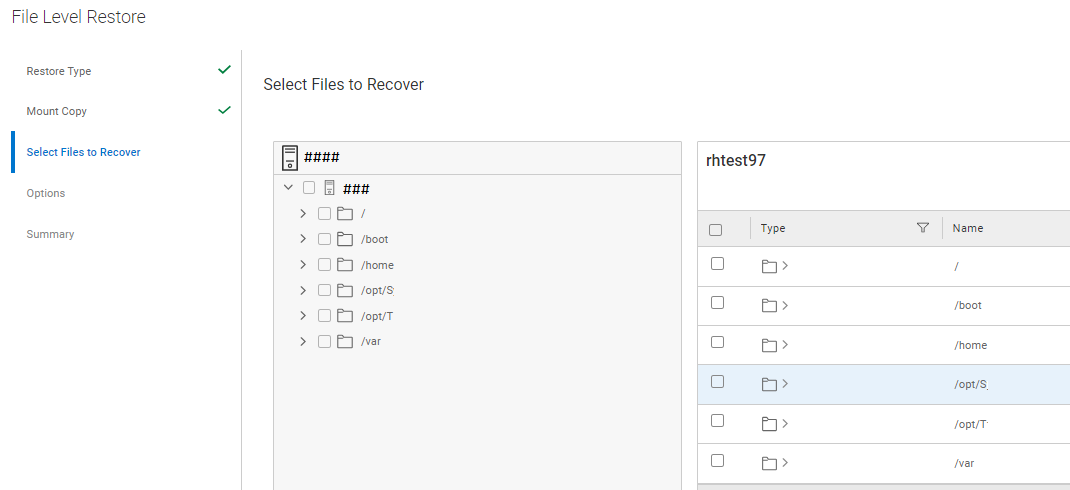
Maintenant, testez la FLR à partir de l’interface graphique Web PPDM- Cela devrait fonctionner
Propriétés de l’article
Numéro d’article: 000215074
Type d’article: Solution
Dernière modification: 23 oct. 2024
Version: 4
Trouvez des réponses à vos questions auprès d’autres utilisateurs Dell
Services de support
Vérifiez si votre appareil est couvert par les services de support.