無法繫結 Dell Security Management Server Virtual 中的 LDAP 11.0 或更新版本
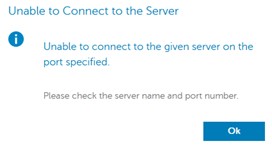
Resumen: 本文探討在遠端管理主控台中繫結 LDAP 時,Dell Security Management Server Virtual v11.0 及更新版本收到錯誤「無法連線至伺服器」的情況。
Este artículo se aplica a
Este artículo no se aplica a
Este artículo no está vinculado a ningún producto específico.
No se identifican todas las versiones del producto en este artículo.
Síntomas
受影響的產品:
- Dell Security Management Server Virtual
受影響的版本:
- v11.0 及更新版本
受影響的作業系統:
- Linux
通常從舊版升級至 Dell Security Management Server Virtual v11.0 或更新版本後,並嘗試使用在更新前可正常運作的相同 LDAP 設定,現在顯示網域狀態不佳,而且嘗試儲存 LDAP 設定時發生錯誤。
嘗試在遠端管理控制台中綁定LDAP時,出現無法連接到伺服器的錯誤。記錄顯示 SSL 交握錯誤:
org.springframework.ldap.CommunicationException: simple bind failed: ADSERVER.DOMAIN.COM:636; nested exception is javax.naming.CommunicationException: simple bind failed: ADSERVER.DOMAIN.COM:636 [Root exception is javax.net.ssl.SSLHandshakeException: No subject alternative DNS name matching ADSERVER.DOMAIN.COM found.]
Causa
自我燒錄憑證和 Java 更新在 v11.0 中。預設啟用端點識別演算法,以提高 LDAPS (安全 LDAP over TLS) 連線的健壯性。從更新紀錄: https://www.oracle.com/technetwork/java/javase/8u181-relnotes-4479407.html

Resolución
依照以下指示修改 wrapper.conf,以停用端點識別。
注意:如果需要,可以通過 SSH 會話執行此操作。如何啟用 SSH:如何在 Dell Security Management Server Virtual 中啟用 SSH
- 停止服務請參閱 如何在 Dell Security Management Server Virtual 中停止與啟動服務。
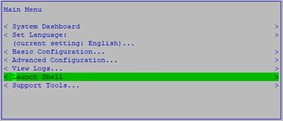
- 從主功能表中,選取 啟動 Shell:
- 在命令前頭輸入
su dellsupport然後按下 Enter 鍵:

- 輸入的密碼
dellsupport帳戶並按下 Enter 鍵:

- 在命令前頭輸入
sudo nano /opt/dell/server/security-server/conf/wrapper.conf。

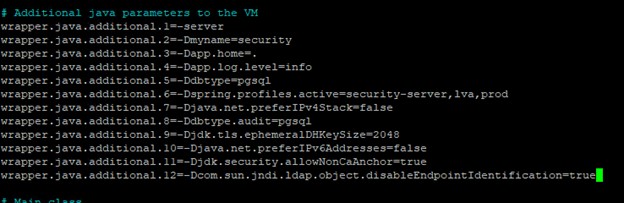
- 在 「# 其他 Java 參數」下,新增下列行:
wrapper.java.additional.XX=-Dcom.sun.jndi.ldap.object.disableEndpointIdentification=true其中 XX 是清單的增量(在本例中我的是 12):
- 按下 CTRL + O 以儲存變更。
- 按下 CTRL + X 以結束。
- 在命令前頭輸入
exit,然後按 Enter 鍵登出dellsupport。

- 在命令前頭輸入
exit,然後按 Enter 鍵,從 Shell 登出主功能表。

- 啟動服務參考 如何在 Dell Security Management Server Virtual 中停止與啟動服務。
現在您可以使用 LDAPs 連接埠繫結網域。
Productos afectados
Dell EncryptionPropiedades del artículo
Número del artículo: 000205453
Tipo de artículo: Solution
Última modificación: 05 jun 2026
Versión: 3
Encuentre respuestas a sus preguntas de otros usuarios de Dell
Servicios de soporte
Compruebe si el dispositivo está cubierto por los servicios de soporte.