Dell Security Management Server Virtual 11.0 이상에서 LDAP를 바인딩할 수 없음
Resumen: 이 문서에서는 Remote Management Console에서 LDAP를 바인딩할 때 Dell Security Management Server Virtual v11.0 이상에서 "서버에 연결할 수 없음" 오류가 발생하는 상황에 대해 설명합니다.
Este artículo se aplica a
Este artículo no se aplica a
Este artículo no está vinculado a ningún producto específico.
No se identifican todas las versiones del producto en este artículo.
Síntomas
영향을 받는 제품:
- Dell Security Management Server Virtual
영향을 받는 버전:
- v11.0 이상
영향을 받는 운영 체제:
- Linux
일반적으로 이전 버전에서 Dell Security Management Server Virtual v11.0 이상으로 업그레이드한 후 업데이트 전에 정상적으로 작동했던 동일한 LDAP 설정을 사용하려고 하면 도메인에 대해 잘못된 상태가 표시되고 LDAP 설정을 저장하려고 할 때 오류가 발생합니다.
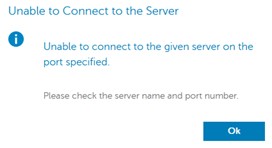
원격 관리 콘솔에서 LDAP를 바인딩하려고 할 때 서버에 연결할 수 없다는 오류가 나타납니다. 로그에 SSL 핸드셰이크 오류가 표시됩니다.
org.springframework.ldap.CommunicationException: simple bind failed: ADSERVER.DOMAIN.COM:636; nested exception is javax.naming.CommunicationException: simple bind failed: ADSERVER.DOMAIN.COM:636 [Root exception is javax.net.ssl.SSLHandshakeException: No subject alternative DNS name matching ADSERVER.DOMAIN.COM found.]
Causa
자체 인증 인증서 및 v11.0의 Java 업데이트. 엔드포인트 식별 알고리듬은 LDAPS(Secure LDAP over TLS) 연결의 안정성을 향상시키기 위해 기본적으로 활성화되어 있습니다. 변경 로그에서: https://www.oracle.com/technetwork/java/javase/8u181-relnotes-4479407.html

Resolución
아래 지침에 따라 wrapper.conf를 수정하여 엔드포인트 식별을 비활성화합니다.
참고: 이 작업은 필요한 경우 SSH 세션을 통해 수행할 수 있습니다. SSH 활성화 방법: Dell Security Management Server Virtual에서 SSH를 활성화하는 방법
- 서비스 중지 참조 Dell Security Management Server Virtual에서 서비스를 중지하고 시작하는 방법.
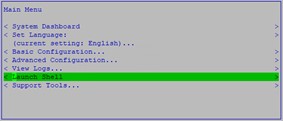
- 기본 메뉴에서 Launch Shell을 선택합니다.
- 실행 대화 상자에
su dellsupportEnter 키를 누릅니다.

- 의 암호를 입력합니다.
dellsupportaccount를 입력하고 Enter 키를 누릅니다.

- 실행 대화 상자에
sudo nano /opt/dell/server/security-server/conf/wrapper.conf.

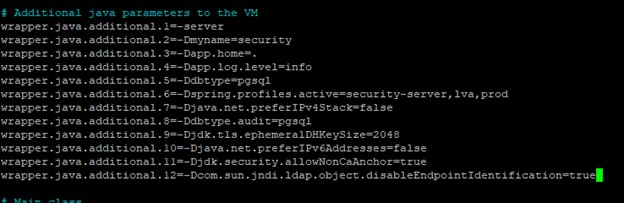
- # Additional java parameters to the VM에서 다음 줄을 추가합니다.
wrapper.java.additional.XX=-Dcom.sun.jndi.ldap.object.disableEndpointIdentification=true여기서 XX는 목록에 증분 적입니다 (이 예에서는 12입니다).
- CTRL + O를 눌러 변경 사항을 저장합니다.
- Ctrl+X를 눌러 종료합니다.
- 실행 대화 상자에
exit그런 다음 Enter 키를 눌러 로그아웃합니다.dellsupport.

- 실행 대화 상자에
exit그런 다음 Enter 키를 눌러 셸에서 Main Menu로 로그아웃합니다.

- 서비스 시작 Dell Security Management Server Virtual에서 서비스를 중지하고 시작하는 방법을 참조하십시오.
이제 LDAP 포트를 사용하여 도메인을 바인딩할 수 있습니다.
Productos afectados
Dell EncryptionPropiedades del artículo
Número del artículo: 000205453
Tipo de artículo: Solution
Última modificación: 05 jun 2026
Versión: 3
Encuentre respuestas a sus preguntas de otros usuarios de Dell
Servicios de soporte
Compruebe si el dispositivo está cubierto por los servicios de soporte.