Dell Private Cloud: Requirements for DPCM custom SSL certificate
Summary: Replace Dell Private Cloud Manager (DPCM) custom certificate requirements.
Instructions
User can follow the DPC plug-in UI function to replace the DPC manager SSL certificate. However, the certificate must meet some requirements to fulfill the DAP security standard.
-
The certificate must be x509 version 3.
-
SubjectAltName must contain DNS Name=machine_FQDN or IP=machine_IP
-
Subject Key Identifier is required.
-
The signature Algorithm in the whole certificate chain should be SHA256 or better.
-
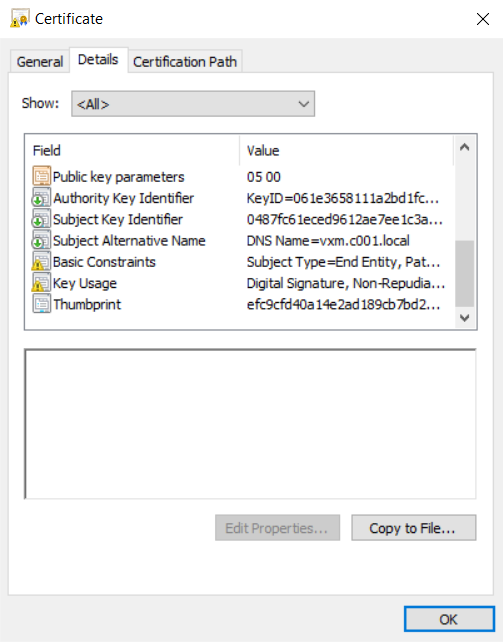
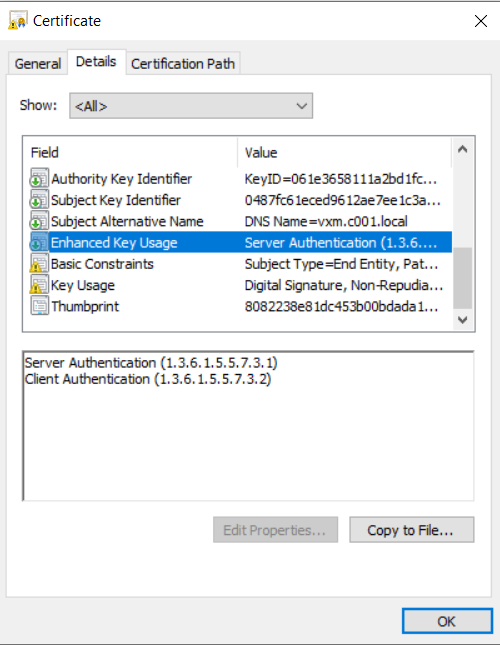
If the certificate has "Enhanced Key Usage" segment, then the "Server Authentication" and "Client Authentication" must be in the "Enhanced Key Usage" segment. Follow the below steps to check the certificate "Enhanced Key Usage."
- On Windows: Change the certificate file extension name to "crt," then double-click the crt file and browse to "Details" page.
The below two cases are both considered as compliance case:-
There is no "Enhanced Key Usage" segment. For example:
-
There is "Enhanced Key Usage" segment, "Server Authentication" and "Client Authentication" are in the "Enhanced Key Usage" segment. For example:
-
- On Linux: Run the command "openssl x509 -in <target_cert> -noout -purpose" to check.
Ensure that both "SSL client" and "SSL server" value are "Yes."$ openssl x509 -in <target_cert> -noout -purpose Certificate purposes: SSL client : Yes SSL client CA : No SSL server : Yes SSL server CA : No Netscape SSL server : Yes Netscape SSL server CA : No S/MIME signing : No S/MIME signing CA : No S/MIME encryption : No S/MIME encryption CA : No CRL signing : No CRL signing CA : No Any Purpose : Yes Any Purpose CA : Yes OCSP helper : Yes OCSP helper CA : No Time Stamp signing : No Time Stamp signing CA : No
- On Windows: Change the certificate file extension name to "crt," then double-click the crt file and browse to "Details" page.