Connectrix Cisco NDFC: Found Config drift for the switch
Summary: Connectrix Cisco NDFC: Found Config drift for the switch.
This article applies to
This article does not apply to
This article is not tied to any specific product.
Not all product versions are identified in this article.
Symptoms
On NDFC - Fabric Controller - Navigate to Analyze > Event Analytics. Click Alarms raised, you find below warning.
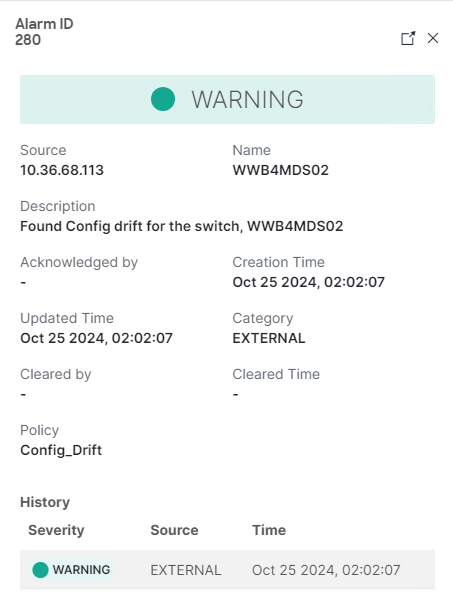
Check these outputs on the subjected switch:
Show run diff
Show zone pending-diff
Show device-alias pending-diff
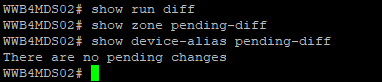
There are no pending changes.
Cause
Configuration drift: Specifies if there is a difference in the current configuration, as compared to the baseline configuration
When you select "Yes" to view the Configuration Differences screen, Baseline and Current configurations are displayed side by side in two columns. The new configuration is highlighted in green color, and the deleted configuration lines are highlighted in red color.
Resetting the baseline clears the configuration drift so that NDFC uses the current configuration on the switches as baseline to monitor for changes. There is no drift to report at that point until the configuration on the switch changes again.
This does not change the switch configurations, it simply sets the NDFC monitor to alert the next time configuration changes on the switch.
For more information, see the topic "Configuration Monitor"
https://www.cisco.com/c/en/us/td/docs/dcn/ndfc/1213/articles/ndfc-about-fabric-overview-for-san-operational-mode-setups/about-fabric-overview-for-san-operational-mode-setups.html

Resolution
If no pending changes on the switch, clear the warning using the following steps.
- Click Fabric Controller > Manage > Fabric
- Select the Fabric and click the pop-out icon on the upper right corner of the screen.
- Go to the Configuration Monitor tab, select the switch from the action menu > Reset Baseline configuration.
Article Properties
Article Number: 000254400
Article Type: Solution
Last Modified: 22 May 2026
Version: 3
Find answers to your questions from other Dell users
Support Services
Check if your device is covered by Support Services.