Dell Networking SONiC: Network Address Translation (NAT)
Summary: This article explains about Network Address Translation (NAT) in Dell Networking SONiC. This article uses a switch running Dell SONiC 4.1.
This article applies to
This article does not apply to
This article is not tied to any specific product.
Not all product versions are identified in this article.
Instructions
|
Prerequisites
Standard interface naming is used to demonstrate the Concepts. See Dell article 202172, Dell Networking S-Series: Basic Interface Configuration - SONiC 4.0 for more information regarding interface naming |
Index
- Introduction
- Enable NAT
- NAT Configuration Order
- NAT Zones
- Static NAT Entry
- Static NAT Example
- Dynamic NAT
- NAT Address Pool
- NAT Binding
- Dynamic NAT timeout
- Dynamic NAT Example
- NAT Configuration Show Commands
Introduction
NOTE: Network Address Translation (NAT) is available only in the Cloud Standard, Cloud Premium, Enterprise Standard, and Enterprise Premium bundles. NAT is not available in the Edge Standard bundle.
Network Address Translation enables the process that assigns a public IP address to devices that access resources outside the network. NAT conserves IP address usage in the local network.
NAT is not required within the network to route traffic between private IP addresses. A NAT gateway translates the private IP addresses of local network devices to a globally unique, public IP address when they communicate with remote devices.
NOTE: Network Address Translation is not supported on the Z9432F-ON.
Enable NAT
To enable NAT and enter NAT configuration commands in NAT Configuration mode:- To enable NAT:
sonic(config-nat)# enable

admin@DELLSONiC:~$ sonic-cli
DELLSONiC# configure terminal
DELLSONiC(config)# nat
DELLSONiC(config-nat)# enable
-
To disable NAT:
DELLSONiC(config-nat)# no enable
NAT Configuration Order
After NAT is enabled, the following steps can be completed in any order:- Configure NAT zones
- Add a static NAT entry
- Add a static NAT entry with a L4 port
- Create a NAT address pool
- Configure NAT binding
- Configure a dynamic NAT timeout
Create NAT Zones
To configure a NAT zone on L3 interfaces so that NAT address translation is performed on packets when a packet traverses a zone on configured interfaces. A NAT zone can be configured on any Ethernet, VLAN, port channel, or loopback interface that is configured with an IP address. The range of NAT zone numbers are from 0 to 3.The source zone of a packet is the zone of the inbound interface on which the packet is received. The destination zone of the packet is the zone of the L3 next-hop interface from the L3 route lookup of the destination address.
- Inbound traffic entering on a source interface is L3 forwarded using static Destination Network Address Translation (DNAT) translation.
- Outbound traffic being sent on a destination interface is dynamically Source Network Address Translation (SNAT) translated.
- L3 interfaces are in NAT zone 0 by default. NAT zone 0 is considered an inside zone.
- To create a NAT zone:
sonic(conf-if-interface)# nat-zone <0..3>

admin@DELLSONiC:~$ sonic-cli
DELLSONiC# configure terminal
DELLSONiC (config)# interface Eth1/2
DELLSONiC (conf-if-Eth1/2)# ip address 20.20.20.20/24
DELLSONiC (conf-if-Eth1/2)# nat-zone 1
DELLSONiC (conf-if-Eth1/2)# exit
DELLSONiC (config)# interface Vlan 5
DELLSONiC (conf-if-Vlan5)# ip address 23.23.23.23/24
DELLSONiC (conf-if-Vlan5)# nat-zone 1
DELLSONiC (conf-if-Vlan5)# exit
DELLSONiC (config)# interface PortChannel 2
DELLSONiC (conf-if-po2)# ip address 25.25.25.25/24
DELLSONiC (conf-if-po2)# nat-zone 1
DELLSONiC (conf-if-po2)# exit
DELLSONiC (config)# interface Loopback 1
DELLSONiC (conf-if-lo1)# ip address 10.10.10.10/32
DELLSONiC (conf-if-lo1)# nat-zone 2
-
Delete a NAT zone:
sonic(conf-if-interface)# no nat-zone <0..3>

DELLSONiC (conf-if-lo1)# no nat-zone 2
Create a Static NAT Entry.
To communicate outside the network over the Internet, a user can manually configure a static NAT entry to replace a local IP address with a globally unique IP address. Static NATs can be created with or without L4 port translation. Static NATs with a L4 port reference can translate a local IP address and TCP or UDP port number into a global IP address with TCP or UDP port number.- To create a static NAT without L4 port translation:
sonic(conf-nat)# static basic global-ip local-ip [snat | dnat] [twice_nat_id value]
- Source NAT (SNAT) - Translates a source IP address in the local network to a global IP address sent to an external network. Remote devices in outside networks use the global address to access the local device.
- Destination NAT (DNAT) - Translates a destination IP address in packets, which are received from an external network and traverse the local network, into a local IP address used in the local network. DNAT is the default.
- twice_nat_id value - Performs address translation on both source and destination IP addresses for static entries which have the same value.
admin@DELLSONiC:~$ sonic-cli
DELLSONiC# configure terminal
DELLSONiC(config)# nat
DELLSONiC(config-nat)# static basic 125.4.4.4 12.1.1.1
DELLSONiC(config-nat)# static basic 100.100.100.100 15.15.15.15 snat twice-nat-id 5
DELLSONiC(config-nat)# static basic 200.200.200.5 17.17.17.17 dnat twice-nat-id 5
- To create a static NAT with L4 port translation:
sonic(conf-nat)# static {tcp | udp} global-ip global-port local-ip local-port [snat | dnat] [twice_nat_id value]
- Source NAT (SNAT) - Translates a source IP address and TCP/UDP port in the local network into a global IP address and TCP/UDP port that is sent to an external network. Remote devices in outside networks use the global address and L4 port to access the local device.
- Destination NAT (DNAT) - Translates a destination IP address and TCP/UDP port in packets, which are received from an external network and traverse the local network, into a local IP address and TCP/UDP port used in the local network. DNAT is the default.
- twice_nat_id value - Performs address translation on both source and destination IP addresses for static entries which have the same ID value.
admin@DELLSONiC:~$ sonic-cli
DELLSONiC# configure terminal
DELLSONiC(config)# nat
DELLSONiC(config-nat)# static udp 148.56.7.7 8991 10.11.1.12 2000
DELLSONiC(config-nat)# static tcp 123.3.4.1 901 11.11.1.1 1000
DELLSONiC(config-nat)# static tcp 65.55.46.6 106 20.0.0.6 206 dnat twice-nat-id 200
DELLSONiC(config-nat)# static tcp 65.55.45.5 100 20.0.0.5 200 snat twice-nat-id 200
- Delete a NAT static entry:
sonic(conf-nat)# no static basic global-ip
sonic(conf-nat)# no static {tcp | udp} global-ip global-port

DELLSONiC(config-nat)# no static basic 125.4.4.4
DELLSONiC(config-nat)# no static basic 100.100.100.100
DELLSONiC(config-nat)# no static basic 200.200.200.5
DELLSONiC(config-nat)# no static udp 148.56.7.7 8991
DELLSONiC(config-nat)# no static tcp 123.3.4.1 901
DELLSONiC(config-nat)# no static tcp 65.55.46.6 106
DELLSONiC(config-nat)# no static tcp 65.55.45.5 100
Static NAT Example
The example below shows that Network A using a router with NAT enabled. When Host 100.100.100.101 on the LAN segment sends traffic towards an external destination (200.200.200.201), the traffic is sent towards the NAT router to be routed towards Host 200.200.200.201 from the Internet. The NAT router translates the Source IP (SRC IP) 100.100.100.101 to a new Source IP 1.1.1.2. The NAT router is performing a Source Network Address Translation (SNAT) where the internal private address of 100.100.100.101 is translated to the external facing address of 1.1.1.2. The NAT router performs a Destination Network Address Translation (DNAT) for the return traffic from Host 200.200.200.201 back into Network A to host 100.100.100.101.

Figure 1: Static Network Address Translation Example
- Configure the NAT Zones:
admin@DELLSONiC:~$ sonic-cli
DELLSONiC# configure terminal
DELLSONiC (config)# interface Eth1/10
DELLSONiC (conf-if-Eth1/10)# ip address 100.100.100.1/24
DELLSONiC (conf-if-Eth1/10)# nat-zone 0
DELLSONiC (conf-if-Eth1/10)# exit
DELLSONiC (config)# interface Eth1/20
DELLSONiC (conf-if-Eth1/20)# ip address 1.1.1.2/30
DELLSONiC (conf-if-Eth1/20)# nat-zone 1
DELLSONiC (conf-if-Eth1/20)# exit
-
Enable NAT:
admin@DELLSONiC:~$ sonic-cli
DELLSONiC# configure terminal
DELLSONiC(config)# nat
DELLSONiC(config-nat)# enable
- Create a static NAT without L4 port translation:
admin@DELLSONiC:~$ sonic-cli
DELLSONiC# configure terminal
DELLSONiC(config)# nat
DELLSONiC(config-nat)# static basic 1.1.1.2 100.100.100.101
Create a Dynamic NAT.
Dynamic NAT replaces a local address with an address from a pool of global addresses.
Dynamic translation is useful when multiple users on a private network access the Internet.
Configure NAT Address Pool
Configure a pool of available global addresses by defining the global IP address range, and optionally the TCP/UDP port range used for local address translation.
- Create NAT address pool:
sonic(conf-nat)# pool pool-name global-ip-range [global-port-range]
- Enter the global IP address range in the format ip-address-ip-address.
- Enter the TCP/UDP port-number range in the format port-number-port-number.
admin@DELLSONiC:~$ sonic-cli
DELLSONiC# configure terminal
DELLSONiC(config)# nat
DELLSONiC(config-nat)# pool Pool1 19.19.19.19
DELLSONiC(config-nat)# pool Pool2 20.0.0.7 1024-65535
DELLSONiC(config-nat)# pool Pool3 65.55.45.10-65.55.45.15 500-1000
- Delete a NAT address pool:
sonic(conf-nat)# no pool pool-name

DELLSONiC(config-nat)# no pool Pool1
- Delete all NAT address pools:
sonic(conf-nat)# no pools
Configure NAT Binding
- Create a NAT Binding to a NAT address pool:
sonic(conf-nat)# binding binding-name pool-name [acl-name] [snat | dnat] [twice_nat_id value]
- SNAT - Translates a source IP address to a global IP address in the pool. SNAT is the default setting in NAT binding.
- DNAT - Translates a destination IP address to a global IP address in the pool.
- twice_nat_id value - Performs address translation on both source, and destination IP addresses using the address pool for static entries which have the same ID value.
- acl-name - To limit the IP addresses in a global NAT address pool, you can use an access control list (ACL). A permit statement allows the IP addresses that have the attributes configured in the permit rule. A deny statement denies packets that have the attributes configured in the deny rule. In an ACL, the do_not_nat entry allows packets to be routed instead of translated.
NOTE: ACL-NAME is an optional argument. If the ACL-NAME argument is not given, the NAT binding is applicable to match all traffic.
admin@DELLSONiC:~$ sonic-cli
DELLSONiC# configure terminal
DELLSONiC(config)# nat
DELLSONiC(config-nat)# binding Bind1 Pool1 10_ACL_IPV4
DELLSONiC(config-nat)# binding Bind2 Pool2 12_ACL_IPV4 snat twice-nat-id 25
DELLSONiC(config-nat)# binding Bind3 Pool3 15_ACL_IPV4 dnat twice-nat-id 25
- Delete a NAT Binding:
sonic(conf-nat)# no binding binding-name

DELLSONiC(config-nat)# no binding Bind1
- Delete all NAT Bindings:
sonic(conf-nat)# no bindings
Configure Dynamic NAT Timeout
By default, only dynamic address translation configurations timeout after 10 minutes (600 seconds) of having no active traffic
There is no timeout for static NAT entries. To change the dynamic NAT timeout value, specify a new value in seconds (300 to 432000).
- Modify dynamic address translation configurations timeout:
sonic(conf-nat)# timeout <300..432000>

admin@DELLSONiC:~$ sonic-cli
DELLSONiC# configure terminal
DELLSONiC(config)# nat
DELLSONiC(config-nat)# timeout 1200
The NAT entry timeouts for L4 UDP and TCP NAT entries can also be adjusted.
To change the TCP timeout for address translation, enter a new timeout value in seconds (300 to 432000; default 86400). To change the UDP timeout for address translation, enter a new value in seconds (120 to 600; default 300).
- Modify dynamic address translation configurations UDP/TCP timeout:
sonic(conf-nat)# udp-timeout <120..600>
sonic(conf-nat)# tcp-timeout <300..432000>

admin@DELLSONiC:~$ sonic-cli
DELLSONiC# configure terminal
DELLSONiC(config)# nat
DELLSONiC(config-nat)# udp-timeout 600
DELLSONiC(config-nat)# tcp-timeout 66460
Dynamic NAT Example
The example below shows that Network A using a router with NAT enabled. When Host 100.100.100.101 on the LAN segment sends traffic towards an external destination (200.200.200.201), the traffic is sent towards the NAT router to be routed towards Host 200.200.200.201 from the Internet. The NAT router translates the Source IP (SRC IP) 100.100.100.101 to a new Source IP 1.1.1.2. The NAT router is performing a Source Network Address Translation (SNAT) where the internal private address of 100.100.100.101 is translated to the external facing address of 1.1.1.2. The NAT router performs a Destination Network Address Translation (DNAT) for the return traffic from Host 200.200.200.201 back into Network A to host 100.100.100.101. The same NAT translation occurs for PC2 communication with PC3.
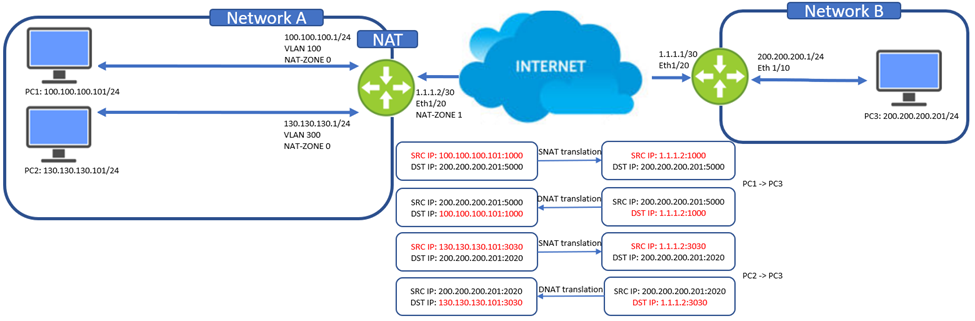
Figure 2: Dynamic Network Address Translation Example
- Configure the NAT Zones:
admin@DELLSONiC:~$ sonic-cli
DELLSONiC# configure terminal
DELLSONiC (config)# interface Vlan 100
DELLSONiC (conf-if-Vlan100)# ip address 100.100.100.1/24
DELLSONiC (conf-if-Vlan100)# nat-zone 0
DELLSONiC (conf-if-Vlan100)# exit
DELLSONiC (config)# interface Vlan 300
DELLSONiC (conf-if-Vlan300)# ip address 130.130.130.1/24
DELLSONiC (conf-if-Vlan300)# nat-zone 0
DELLSONiC (conf-if-Vlan300)# exit
DELLSONiC (config)# interface Eth1/20
DELLSONiC (conf-if-Eth1/20)# ip address 1.1.1.2/30
DELLSONiC (conf-if-Eth1/20)# nat-zone 1
DELLSONiC (conf-if-Eth1/20)# exit
- Enable NAT:
admin@DELLSONiC:~$ sonic-cli
DELLSONiC# configure terminal
DELLSONiC(config)# nat
DELLSONiC(config-nat)# enable
- Create a NAT pool:
admin@DELLSONiC:~$ sonic-cli
DELLSONiC# configure terminal
DELLSONiC(config)# nat
DELLSONiC(config-nat)# pool Pool1 1.1.1.2
- Create a NAT Binding:
admin@DELLSONiC:~$ sonic-cli
DELLSONiC# configure terminal
DELLSONiC(config)# nat
DELLSONiC(config-nat)# binding Bind1 Pool1
View NAT Configuration
Use these commands to display the NAT configuration and operation and NAT table entries.
- View NAT translation table:
S5296F-Mid-SPINE# show nat translations
Protocol            Source              Destination         Translated Source   Translated Destination
----------------------------------------------------------------------------------------------------------------------------
all                 10.32.20.3          ----                100.100.100.1       ----
all                 ----                100.100.100.1       ----                10.32.20.3
udp                 ----                10.32.20.2:311      ----                100.100.100.100:63
udp                 100.100.100.100:63  ----                10.32.20.2:311      ----
- To clear NAT translation entries:
DELLSONiC# clear nat translations
- View NAT translation statistics:
DELLSONiC# show nat statistics
-----------------------------------------------------------------------------
Protocol       Source                        Destination                   Packets             Bytes
-----------------------------------------------------------------------------
udp            100.100.100.100:63            ---                           15522575563164      993444836042496
- View NAT and NAT configuration:
DELLSONiC# show nat config static
---------------------------------------------------------------------------------------------------------------------
Nat Type       IP Protocol         Global IP                     Global L4 Port      Local IP                      Local L4 Port       Twice-Nat Id
----------------------------------------------------------------------------------------------------------------------------
dnat           all                 100.100.100.1                 ----                10.32.20.3                    ----                ----
- View NAT pools:
DELLSONiC# show nat config pool
Pool Name           Global IP Range               Global L4 Port Range
-----------------------------------------------------------------------------
POOL1               100.100.100.2                 1024-6034
POOL2               100.100.100.3-100.100.100.4   ----
- View NAT binding configuration:
DELLSONiC# show nat config bindings
Binding Name  Pool Name      Access-List         Nat Type       Twice-Nat Id
-----------------------------------------------------------------------------
EXT1          POOL1          ----                ----           ---
EXT2          POOL2          NAT_IPS             ----           ---
- View Global NAT configuration:
DELLSONiC# show nat config globalvalues
Admin Mode     : enabled
Global Timeout : 600 secs
TCP Timeout    : 86400 secs
UDP Timeout    : 300 secs
- View L3 Interface Zones:
DELLSONiC# show nat config zones
Port                Zone
-------------------------------------------------
Eth1/1              2
PortChannel12       2
Vlan200             1
Loopback1           1
-
View NAT Translation Counts:
DELLSONiC# show nat translations count
Static NAT Entries        ................. 2
Static NAPT Entries       ................. 0
Dynamic NAT Entries       ................. 0
Dynamic NAPT Entries      ................. 2
Static Twice NAT Entries  ................. 0
Static Twice NAPT Entries ................. 0
Dynamic Twice NAT Entries ................. 0
Dynamic Twice NAPT Entries ................ 0
Total SNAT/SNAPT Entries   ................ 2
Total DNAT/DNAPT Entries   ................ 2
Total Entries    .......................... 4
Affected Products
Enterprise SONiC Distribution, PowerSwitch S5212F-ON, PowerSwitch S5224F-ON, PowerSwitch S5232F-ON, PowerSwitch S5248F-ON, PowerSwitch S5296F-ON, PowerSwitch Z9264F-ON, PowerSwitch Z9332F-ONArticle Properties
Article Number: 000220835
Article Type: How To
Last Modified: 08 Feb 2024
Version: 5
Find answers to your questions from other Dell users
Support Services
Check if your device is covered by Support Services.