VxRail Manager Cannot Discover Host during VI Workload Domain Cluster Initial Configuration
Summary: The VxRail manager cannot discover any host in the deployment wizard UI for Deploy VI workload domain cluster in VCF on VxRail environment.
This article applies to
This article does not apply to
This article is not tied to any specific product.
Not all product versions are identified in this article.
Symptoms
Following VCF on VxRail procedure to deploy VI workload domain cluster.
The VxRail manager default IPv4 address 1X2.1X8.10.2X0 is changed to a customer-designated address.
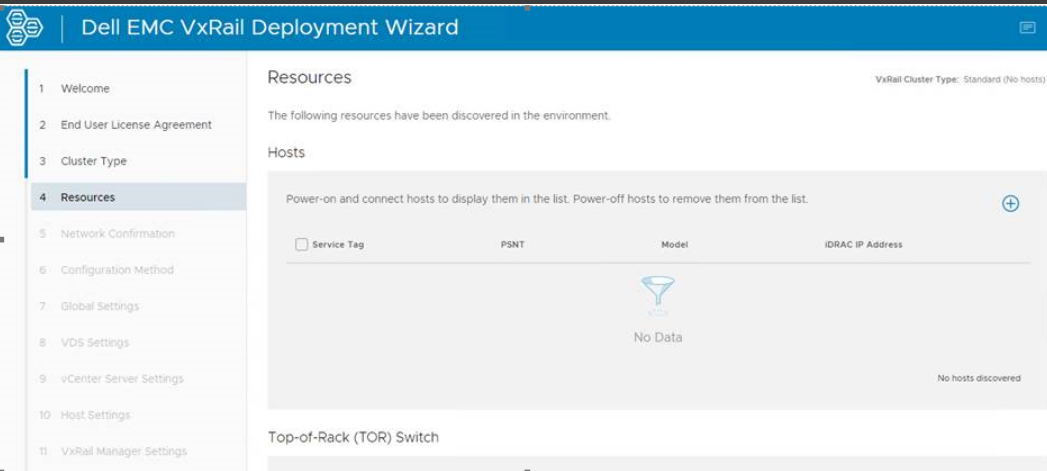
Going to this new IP address in the browser to open cluster deployment wizard UI, under Resources page, there is no host discovered.
Run command "ifconfig eth1" on VxRail manager, the eth1 has an IPv6 address fe80::xxxxxxxxx
localhost:/home/mystic # ifconfig eth1
eth1: flags=4163<UP,BROADCAST,RUNNING,MULTICAST>  mtu 1500
        inet6 fe80::xxxxxxxxx  prefixlen 64  scopeid 0x20<link>
        ether xx:xx:xx:xx  txqueuelen 1000  (Ethernet)
        RX packets 157  bytes 80631 (78.7 KiB)
        RX errors 0  dropped 0  overruns 0  frame 0
        TX packets 125  bytes 22152 (21.6 KiB)
        TX errors 0  dropped 0 overruns 0  carrier 0  collisions 0
Check dayone.log on VxRail manger:
do-host query data failed due to it cannot connect to host 9090 port via host IPv6 address fc00:xxxxxxxxx


"2023-05-22 16:30:08,371" microservice.do-host "2023-05-22T16:30:08.141518523Z stderr F 2023-05-22 16:30:08,141 [ERROR]
<Dummy-1000:139758144551752> linzhi_dataloader.py fetch_async() (84): Query data failed,
url:https://[fc00:xxxxxxxxx]:9090/rest/ps/private/v1/status,Exception:Cannot connect to host fc00:xxxxxxxxx:9090
 ssl:<gevent._ssl3.SSLContext object at 0x7f1bfa7f2748> [Connect call failed ('fc00:xxxxxxxxx', 9090, 0, 0)]"
Cause
IPv6 Auto configuration is enabled on the ESXi hosts and TOR switch. The ESXi host vmk0 is configured with Autoconfiguration IPv6 address fc00: xxxxxxxxx.
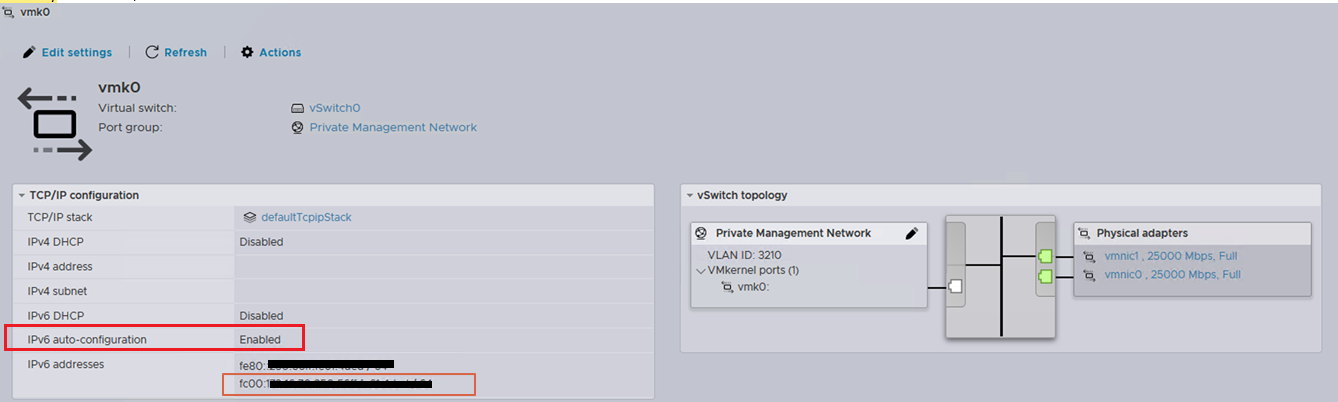
As a result, VxRail manager cannot communicate with host
vmk0 fc00: xxxxxxxxx using VxRail manager eth1 link-local address fe80: xxxxxxxxx.Resolution
VxRail plans to address this issue in a future release so that the VxRail manager only communicates to host
Perform below steps as a workaround:
vmk0 link-local IPv6 address.
Perform below steps as a workaround:
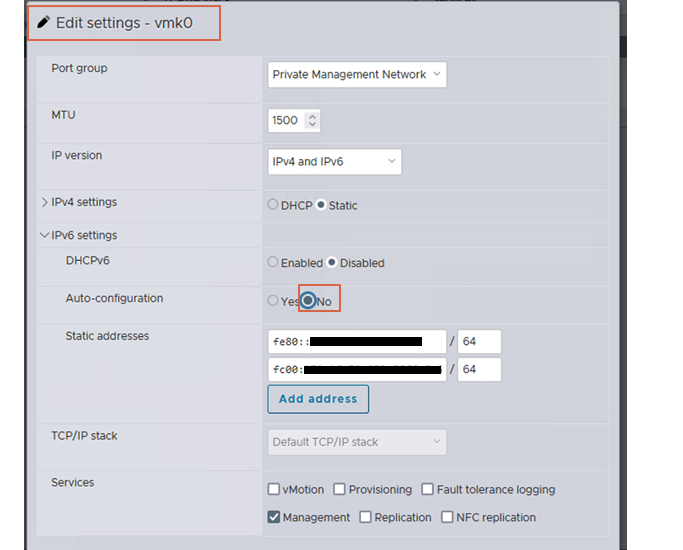
- Log in to vSphere host client UI, edit
vmk0, and set IPv6 Autoconfiguration to No.
- Restart Loudmouth service on ESXi host:
/etc/init.d/loudmouth restart
- Repeat step 1 and step 2 on each host.
- SSH to the VxRail manger and restart Loudmouth service by below command using root user:
service vmware-loudmouth restart
- Run the below command on VxRail manager to check Loudmouth output, confirm that each host only has one IPv6 address starting with
fe80:
/usr/lib/vmware-loudmouth/bin/loudmouthc query
- Launch the Cluster Deployment UI again.
Additional Information
Check the VMware article for details of how to change the VxRail manager default IPv4 address before deploying the cluster.
VCF on Dell VxRail Guide
VCF on Dell VxRail Guide
Article Properties
Article Number: 000214834
Article Type: Solution
Last Modified: 18 May 2026
Version: 9
Find answers to your questions from other Dell users
Support Services
Check if your device is covered by Support Services.