Avamar: MCS Failed to Start During Avamar Upgrade
Summary: MCS failed to start during the Avamar upgrade.
This article applies to
This article does not apply to
This article is not tied to any specific product.
Not all product versions are identified in this article.
Symptoms
MCS is not starting during installation, the Avamar Installation Manager (avi) shows an error.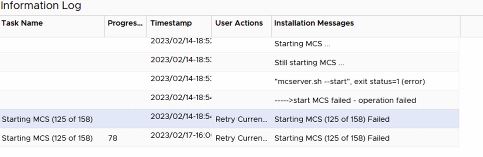
Check what the problem is by running as admin:
mcserver.sh --start --verbose
Expected output:
Wait VC cache pool synchronized done for vc /myvcenter.org at Fri Feb 17 16:18:04 GMT 2023  Total time(ms) - 0
Wait VC cache pool synchronized done for vc /myvcenter.org at Fri Feb 17 16:18:04 GMT 2023  Total time(ms) - 0
Install service: com.avamar.mc.vmware.VmwareService, processing time = 16134ms
Install service: com.avamar.mc.pdm.ProxyDeploymentManagerService, processing time = 48ms
Install service: com.avamar.mc.mon.MonitorService, processing time = 581ms
Install service: com.avamar.mc.mcsm.MCSManagerService, processing time = 256ms
Install service: com.avamar.mc.lm.LicenseManagerService, processing time = 138ms
Install service: com.avamar.mc.rpt.ReportService, processing time = 139ms
Install service: com.avamar.mc.ws.MCWebServices, processing time = 124ms
Install service: com.avamar.mc.ws.MCJettyService, processing time = 2202ms
Install service: com.avamar.mc.repl.ReplicationService, processing time = 106ms
com.avamar.asn.service.ServiceException: Unable to install services.
        at com.avamar.asn.service.ServiceContainerImpl.load(ServiceContainerImpl.java:417)
        at com.avamar.asn.service.ServiceContainerImpl.start(ServiceContainerImpl.java:210)
        at com.avamar.asn.Node.start(Node.java:467)
        at com.avamar.mc.CLI.start(CLI.java:361)
        at com.avamar.mc.CLI.process(CLI.java:133)
        at com.avamar.mc.CLI.main(CLI.java:104)
Caused by: com.avamar.asn.service.ServiceException: Unable to install service. Class: com.avamar.mc.st.SessionTicketService
        at com.avamar.asn.service.ServiceContainerImpl.installService(ServiceContainerImpl.java:488)
        at com.avamar.asn.service.ServiceContainerImpl.load(ServiceContainerImpl.java:409)
        ... 5 more
Caused by: com.avamar.asn.service.ServiceException: Unable to start service.
        at com.avamar.mc.st.SessionTicketService.start(SessionTicketService.java:241)
        at com.avamar.asn.service.ServiceContainerImpl.installService(ServiceContainerImpl.java:478)
        ... 6 more
Caused by: com.avamar.asn.service.ServiceException: Unable to start service.
        at com.avamar.mc.st.SessionTicketService.start(SessionTicketService.java:156)
        ... 7 more
Administrator Server startup failed at Fri Feb 17 16:18:07 GMT 2023: Closing all connections to database. Node start failed.
pid_file=/usr/local/avamar/var/mc/server_log/mc-rest-api.pid
out_file=/usr/local/avamar/var/mc/server_log/mc-rest-api.out
log_file=/usr/local/avamar/var/mc/server_log/mc-rest-api.log
---------------------------------
nohup java -server -Xms256m -Xmx512m -Djava.security.egd=file:/dev/./urandom -XX:+HeapDumpOnOutOfMemoryError -XX:HeapDumpPath=/usr/local/avamar/var/mc -jar /usr/local/avamar/lib/rest-api.jar --mcs.address=myavamar.org --spring.profiles.active=production >/usr/local/avamar/var/mc/server_log/mc-rest-api.out 2>&1 &
Starting REST API Service......
REST API Service startup failed.
Start MC Rest: processing time = 14 s.

Already started, PID: [3000]
Cause
Keystore issue, having the wrong permissions
Resolution
Confirm if the issue is related to a keystore misconfiguration.
Download and install the Goav tool.
000192151 | Avamar GOAV: How to use GOAV tool replacing PROXYCP via CLI to manage VMware configuration
Download GOAV:
Download the GOAV from Central Dell site.
Transfer the file to an Avamar server using WinSCP (or similar tool)
Once Goav has been placed on Avamar, go to the directory and make the tool executable.
chmod a+x goav
Run the goav with the following options: ./goav security keystore check-config
Expected output:
root@myavamar:/home/admin/#: ./goav security keystore check-config
===========================================================
GoAv    :        1.49
Avamar  :        19.8
Date    :        17 Feb 2023 08:38 PST
===========================================================
COMMAND :  ./goav security keystore check-config
NOTE: This is not an official tool
===========================================================
Table: Keystore Existence/Permissions Check
-------------------------------------------

          Name         |                  Path                  | Exists | Current Permissions | Expected Permissions | Current Ownership | Expected Ownership
-----------------------+----------------------------------------+--------+---------------------+----------------------+-------------------+---------------------
  RMI_SSL_KEYSTORE     | /usr/local/avamar/lib/rmi_ssl_keystore | true   | rw-rw----           | rw-rw-r--            | root admin        | root admin
  AVAMAR_KEYSTORE      | /usr/local/avamar/lib/avamar_keystore  | true   | rw-rw----           | rw-rw-r--            | root root         | root admin
  AVINSTALLER_KEYSTORE | /usr/local/avamar/lib/avi/avi_keystore | true   | rw-r--r--           | rw-r--r--            | avi avi           | avi avi
  TOMCAT_KEYSTORE      | /data01/home/tomcat/.keystore          | true   | rw-r-----           | rw-r-----            | root tomcat       | root tomcat


Task: Lockbox Passphrase Check
------------------------------

Keystore Passphrase (From Lockbox): changeme


Table: Lockbox/Keystore Passphrase Match
----------------------------------------

          Name         |  Lockbox/Keystore Passphrase
                       |             Match
-----------------------+---------------------------------
  RMI_SSL_KEYSTORE     | true
  AVAMAR_KEYSTORE      | true
  AVINSTALLER_KEYSTORE | true
  TOMCAT_KEYSTORE      | true


Keystore Format (JKS/PKCS12)
----------------------------

          Name         | Format
-----------------------+---------
  RMI_SSL_KEYSTORE     | PKCS12
  AVAMAR_KEYSTORE      | PKCS12
  AVINSTALLER_KEYSTORE | PKCS12
  TOMCAT_KEYSTORE      | PKCS12


Table: Keystore Alias Check
---------------------------

          Name         |                  Path                  |   Alias   | Exists
-----------------------+----------------------------------------+-----------+---------
  RMI_SSL_KEYSTORE     | /usr/local/avamar/lib/rmi_ssl_keystore | mcssl     | true
  RMI_SSL_KEYSTORE     | /usr/local/avamar/lib/rmi_ssl_keystore | mcjwt     | true
  AVAMAR_KEYSTORE      | /usr/local/avamar/lib/avamar_keystore  | mcecroot  | true
  AVAMAR_KEYSTORE      | /usr/local/avamar/lib/avamar_keystore  | mcectls   | true
  AVAMAR_KEYSTORE      | /usr/local/avamar/lib/avamar_keystore  | mcrsaroot | true
  AVAMAR_KEYSTORE      | /usr/local/avamar/lib/avamar_keystore  | mcrsatls  | true
  AVINSTALLER_KEYSTORE | /usr/local/avamar/lib/avi/avi_keystore | tomcat    | true
  AVINSTALLER_KEYSTORE | /usr/local/avamar/lib/avi/avi_keystore | mcssl     | true
  TOMCAT_KEYSTORE      | /data01/home/tomcat/.keystore          | tomcat    | true
  TOMCAT_KEYSTORE      | /data01/home/tomcat/.keystore          | mcssl     | true


Summary
-------

*** FAIL *** keystore check-config FAILED OVERALL
PROBLEM: RMI_SSL_KEYSTORE ownership/permissions incorrect
PROBLEM: AVAMAR_KEYSTORE ownership/permissions incorrect
Gather the summary report and decide on whether to run the script to automatically fix the keystore misconfiguration. New information is that while upgrade to code 19.9 tomcat_keystore location changed:
| TOMCAT_KEYSTORE      | /home/tomcat/.keystore                 | tomcat    | false  |
| TOMCAT_KEYSTORE      | /home/tomcat/.keystore                 | mcssl     | false  |
+----------------------+----------------------------------------+-----------+--------+

*** FAIL *** keystore check-config FAILED OVERALL
PROBLEM: RMI_SSL_KEYSTORE ownership/permissions incorrect
PROBLEM: AVAMAR_KEYSTORE ownership/permissions incorrect
Before run goav to fix the store issue, we need to create the tomcat user and group and prepare the home directory.
/usr/local/avamar/bin/avsetup_tomcat
Expected output after that:
root@myavamar:/home/admin/#:grep tomcat /etc/passwd
tomcat:x:486:487:Tomcat Web Server:/home/tomcat:/sbin/nologin

root@myavamar:/home/admin/#:grep tomcat /etc/group
admin:x:500:avi,tomcat
tomcat:x:487:

root@myavamar:/home/admin/#:ls -l /home/ | grep tom
drwxr-xr-x  6 tomcat tomcat  171 Aug 16 20:29 tomcat
To resolve the ***FAIL*** message run:
./goav security keystore check-config --fix
Then run the ./goav security keystore check-config to check the ***FAIL*** message is gone.
Start the MCS as admin:
mcserver.sh --start --verbose
Complete the installation in the Avinstaller web page.
Article Properties
Article Number: 000211462
Article Type: Solution
Last Modified: 28 May 2024
Version: 3
Find answers to your questions from other Dell users
Support Services
Check if your device is covered by Support Services.