RecoverPoint for VMs: Plugin dashboard does not show any information
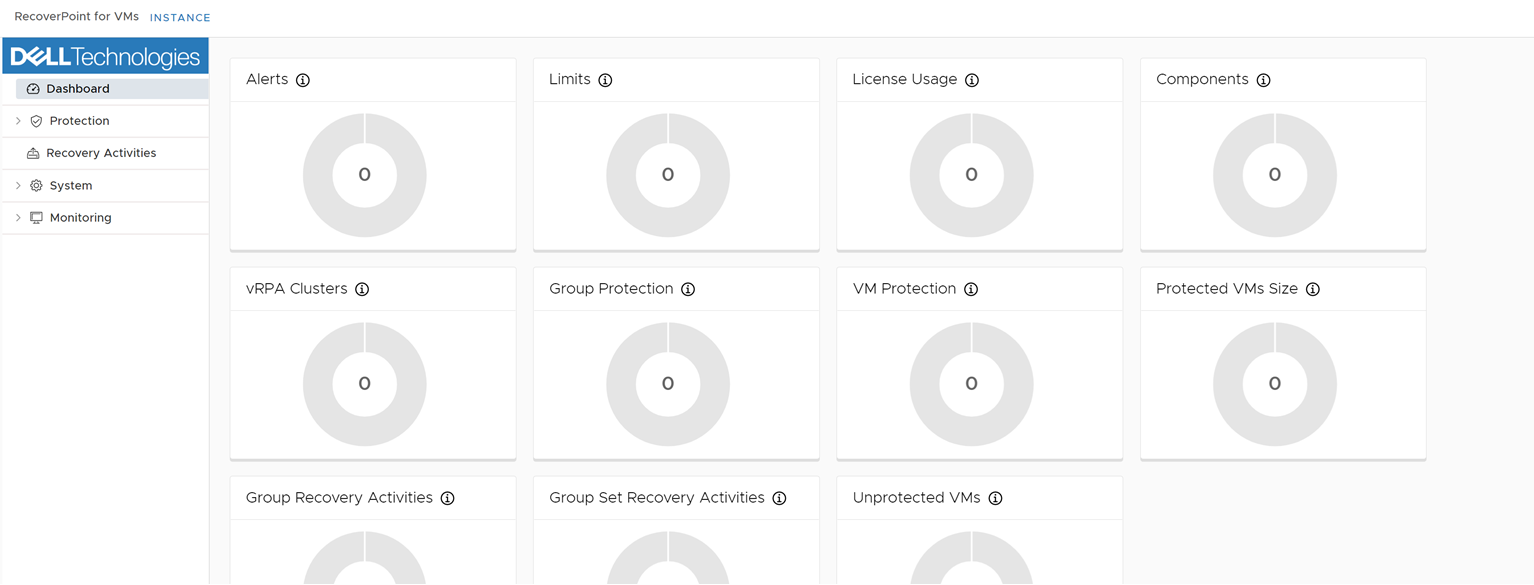
Summary: The plugin dashboard does not show any information regarding RecoverPoint status.
This article applies to
This article does not apply to
This article is not tied to any specific product.
Not all product versions are identified in this article.
Symptoms
When you open RecoverPoint Plugin in vCenter, no information is displayed regarding RecoverPoint cluster status.
Cause
When looking at Plugin logs from the log bundle, we have the following entries:
rpc_authentication.log
rpc_rp_inventory.log
rpc_vc_inventory.log
When you look at the RecoverPoint side, you may see the below entries in vi_connector.log, located at /home/kos/connectors/logs:
rpc_authentication.log
Dec 01 11:53:55 linux-b2we run.sh[630]: authentication [ERROR] (vcs_monitor.py:79) - Error getting custom fields for VC f3918e15-341b-42f5-0000-a0b8f7b1ca29 ((500)
Dec 01 11:53:55 linux-b2we run.sh[630]: Reason: INTERNAL SERVER ERROR
Dec 01 11:53:55 linux-b2we run.sh[630]: HTTP response headers: HTTPHeaderDict({'Date': 'Thu, 01 Dec 2022 10:53:55 GMT', 'Content-Type': 'application/json', 'Content-Length': '118', 'Connection': 'keep-alive'})
Dec 01 11:53:55 linux-b2we run.sh[630]: HTTP response body: {"error":{"code":"994000705","message":"Invalid login failed connecting to VC f3918e15-341b-42f5-0000-a0b8f7b1ca29"}}
Dec 01 11:53:55 linux-b2we run.sh[630]: ).
Dec 01 11:53:55 linux-b2we run.sh[630]: authentication [ERROR] (vcs_monitor.py:66) - Error connecting to VC Inventory service
Dec 01 11:55:00 linux-b2we run.sh[630]: authentication [ERROR] (vcs_monitor.py:79) - Error getting custom fields for VC f3918e15-341b-42f5-0000-a0b8f7b1ca29 ((500)
Dec 01 11:55:00 linux-b2we run.sh[630]: Reason: INTERNAL SERVER ERROR
Dec 01 11:55:00 linux-b2we run.sh[630]: HTTP response headers: HTTPHeaderDict({'Date': 'Thu, 01 Dec 2022 10:55:00 GMT', 'Content-Type': 'application/json', 'Content-Length': '118', 'Connection': 'keep-alive'})
Dec 01 11:55:00 linux-b2we run.sh[630]: HTTP response body: {"error":{"code":"994000705","message":"Invalid login failed connecting to VC f3918e15-341b-42f5-0000-a0b8f7b1ca29"}}
Dec 01 11:55:00 linux-b2we run.sh[630]: ).
rpc_rp_inventory.log
Dec 01 11:53:52 linux-b2we run.sh[623]: rp_inventory [ERROR] (rp_clusters_monitor.py:69) - Cannot collect rp_clusters from VC f3918e15-341b-42f5-0000-a0b8f7b1ca29 due to internal error
Dec 01 11:53:52 linux-b2we run.sh[623]: Traceback (most recent call last):
Dec 01 11:53:52 linux-b2we run.sh[623]: File "/opt/rpcenter/rp_inventory/rp_inventory/rp_clusters_monitor.py", line 66, in _get_rp_clusters_from_vcs
Dec 01 11:53:52 linux-b2we run.sh[623]: custom_fields = self._vc_inventory_proxy.get_custom_field_definitions(vc.id)
Dec 01 11:53:52 linux-b2we run.sh[623]: File "/opt/rpcenter/rp_inventory/generated/vc_inventory_proxy/vc_inventory_proxy/api/vc_inventory_api.py", line 781, in get_custom_field_definitions
Dec 01 11:53:52 linux-b2we run.sh[623]: (data) = self.get_custom_field_definitions_with_http_info(vc_id, **kwargs) # noqa: E501
Dec 01 11:53:52 linux-b2we run.sh[623]: File "/opt/rpcenter/rp_inventory/generated/vc_inventory_proxy/vc_inventory_proxy/api/vc_inventory_api.py", line 856, in get_custom_field_definitions_with_http_info
Dec 01 11:53:52 linux-b2we run.sh[623]: collection_formats=collection_formats)
Dec 01 11:53:52 linux-b2we run.sh[623]: File "/opt/rpcenter/rp_inventory/generated/vc_inventory_proxy/vc_inventory_proxy/api_client.py", line 342, in call_api
Dec 01 11:53:52 linux-b2we run.sh[623]: _preload_content, _request_timeout, _host)
Dec 01 11:53:52 linux-b2we run.sh[623]: File "/opt/rpcenter/rp_inventory/generated/vc_inventory_proxy/vc_inventory_proxy/api_client.py", line 173, in __call_api
Dec 01 11:53:52 linux-b2we run.sh[623]: _request_timeout=_request_timeout)
Dec 01 11:53:52 linux-b2we run.sh[623]: File "/opt/rpcenter/rp_inventory/generated/vc_inventory_proxy/vc_inventory_proxy/api_client.py", line 365, in request
Dec 01 11:53:52 linux-b2we run.sh[623]: headers=headers)
Dec 01 11:53:52 linux-b2we run.sh[623]: File "/opt/rpcenter/rp_inventory/generated/vc_inventory_proxy/vc_inventory_proxy/rest.py", line 240, in GET
Dec 01 11:53:52 linux-b2we run.sh[623]: query_params=query_params)
Dec 01 11:53:52 linux-b2we run.sh[623]: File "/opt/rpcenter/rp_inventory/generated/vc_inventory_proxy/vc_inventory_proxy/rest.py", line 230, in request
Dec 01 11:53:52 linux-b2we run.sh[623]: raise ApiException(http_resp=r)
Dec 01 11:53:52 linux-b2we run.sh[623]: vc_inventory_proxy.exceptions.ApiException: (500)
Dec 01 11:53:52 linux-b2we run.sh[623]: Reason: INTERNAL SERVER ERROR
Dec 01 11:53:52 linux-b2we run.sh[623]: HTTP response headers: HTTPHeaderDict({'Date': 'Thu, 01 Dec 2022 10:53:52 GMT', 'Content-Type': 'application/json', 'Content-Length': '118', 'Connection': 'keep-alive'})
Dec 01 11:53:52 linux-b2we run.sh[623]: HTTP response body: {"error":{"code":"994000705","message":"Invalid login failed connecting to VC f3918e15-341b-42f5-0000-a0b8f7b1ca29"}}
rpc_vc_inventory.log
Dec 01 11:53:52 linux-b2we run.sh[617]: vc_inventory [ERROR] (vc_service_impl.py:447) - Invalid login failed connecting to VC f3918e15-341b-42f5-0000-a0b8f7b1ca29
Dec 01 11:53:52 linux-b2we run.sh[617]: Traceback (most recent call last):
Dec 01 11:53:52 linux-b2we run.sh[617]: File "/opt/rpcenter/vc_inventory/vc_inventory/server_impl/vc_service_impl.py", line 489, in get_custom_field_definitions
Dec 01 11:53:52 linux-b2we run.sh[617]: with self.generate_vc_proxy_by_id(vc_id) as vc_proxy:
Dec 01 11:53:52 linux-b2we run.sh[617]: File "/opt/rpcenter/vc_inventory/vc_inventory/server_impl/vc_proxy.py", line 21, in __enter__
Dec 01 11:53:52 linux-b2we run.sh[617]: self._service_instance = self._ssl_connect_to_vc()
Dec 01 11:53:52 linux-b2we run.sh[617]: File "/opt/rpcenter/vc_inventory/vc_inventory/server_impl/vc_proxy.py", line 40, in _ssl_connect_to_vc
Dec 01 11:53:52 linux-b2we run.sh[617]: sslContext=context)
Dec 01 11:53:52 linux-b2we run.sh[617]: File "/usr/lib/python3.6/site-packages/pyVim/connect.py", line 856, in SmartConnect
Dec 01 11:53:52 linux-b2we run.sh[617]: mechanism=mechanism)
Dec 01 11:53:52 linux-b2we run.sh[617]: File "/usr/lib/python3.6/site-packages/pyVim/connect.py", line 266, in Connect
Dec 01 11:53:52 linux-b2we run.sh[617]: keyFile, certFile, thumbprint, sslContext, connectionPoolTimeout)
Dec 01 11:53:52 linux-b2we run.sh[617]: File "/usr/lib/python3.6/site-packages/pyVim/connect.py", line 390, in __Login
Dec 01 11:53:52 linux-b2we run.sh[617]: x = content.sessionManager.Login(user, pwd, None)
Dec 01 11:53:52 linux-b2we run.sh[617]: File "/usr/lib/python3.6/site-packages/pyVmomi/VmomiSupport.py", line 706, in <lambda>
Dec 01 11:53:52 linux-b2we run.sh[617]: self.f(*(self.args + (obj,) + args), **kwargs)
Dec 01 11:53:52 linux-b2we run.sh[617]: File "/usr/lib/python3.6/site-packages/pyVmomi/VmomiSupport.py", line 512, in _InvokeMethod
Dec 01 11:53:52 linux-b2we run.sh[617]: return self._stub.InvokeMethod(self, info, args)
Dec 01 11:53:52 linux-b2we run.sh[617]: File "/usr/lib/python3.6/site-packages/pyVmomi/SoapAdapter.py", line 1374, in InvokeMethod
Dec 01 11:53:52 linux-b2we run.sh[617]: raise obj # pylint: disable-msg=E0702
Dec 01 11:53:52 linux-b2we run.sh[617]: pyVmomi.VmomiSupport.vim.fault.InvalidLogin: (vim.fault.InvalidLogin) {
Dec 01 11:53:52 linux-b2we run.sh[617]: dynamicType = <unset>,
Dec 01 11:53:52 linux-b2we run.sh[617]: dynamicProperty = (vmodl.DynamicProperty) [],
Dec 01 11:53:52 linux-b2we run.sh[617]: msg = 'Cannot complete login due to an incorrect user name or password.',
Dec 01 11:53:52 linux-b2we run.sh[617]: faultCause = <unset>,
Dec 01 11:53:52 linux-b2we run.sh[617]: faultMessage = (vmodl.LocalizableMessage) []
Dec 01 11:53:52 linux-b2we run.sh[617]: }
When you look at the RecoverPoint side, you may see the below entries in vi_connector.log, located at /home/kos/connectors/logs:
vi_connector.log
2022-12-01 13:38:33,164 [pool-2-thread-359] (BaseCommand.java:33) DEBUG - Command started: AddArrayCredentialsRPACommand(ID:7991951650527957800)
2022-12-01 13:38:39,433 [pool-2-thread-359] (Cache.java:86) DEBUG - Caught invalid login: VI SDK invoke exception:com.vmware.vim25.InvalidLogin; nested exception is:
com.vmware.vim25.InvalidLogin
2022-12-01 13:38:39,434 [pool-2-thread-359] (Cache.java:87) ERROR - Could not register VC due to bad credentials, registering mock placeholder instead VI SDK invoke exception:com.vmware.vim25.InvalidLogin; nested exception is:
com.vmware.vim25.InvalidLogin
2022-12-01 13:38:39,435 [pool-2-thread-359] (Cache.java:73) ERROR - Failed creating Vsphere Connection, arrayID: ManagedArrayID(id=229605786688152646)credentials:Credentials(ip=xxx.xxx.xxx.xxx, user=VC_USER@vsphere.local, certificate=-----BEGIN CERTIFICATE-----

2022-12-01 13:38:44,318 [pool-2-thread-359] (Cache.java:87) ERROR - Could not register VC due to bad credentials, registering mock placeholder instead VI SDK invoke exception:com.vmware.vim25.InvalidLogin; nested exception is:
com.vmware.vim25.InvalidLogin

2022-12-01 13:38:44,318 [pool-2-thread-359] (GetVCConnectorRPACommand.java:31) ERROR - VC: VcUuid(super=Uuid(uuid=f3918e15-341b-42f5-0000-a0b8f7b1ca29)), does not exist
com.emc.recoverpoint.connectors.vi.rpa.exceptions.InvalidVcCredentialsException: Cannot connect to vc. VC should be re-registered with the correct credentials
The cause for the vCenter user login failure can be related to:
- Expired password for user VC_USER@vsphere.local, because Maximum lifetime exceeded allowed by vCenter PASSWORD POLICY.
- Locked user account, because reached the Maximum number of failed login attempts allowed by vCenter LOCKOUT POLICY.
NOTE: VC_USER@vsphere.local account is being used by RecoverPoint to establish the communication with vCenter.
Resolution
Workaround:
In order to resolve the issue stated above, you have to:
Resolution:
The issue stated on this knowledge article is not related to RecoverPoint, no changes need to be applied on the product.
In order to resolve the issue stated above, you have to:
- If the VC_USER@vsphere.local account has its password expired, you have to renew it on vCenter.
- If the VC_USER@vsphere.local account is locked, you have to understand if the value given for Maximum number of failed login attempts, is properly setup. You may increase that value to allow more failures.
- Sometimes, you may have to register the Plugin again on the RecoverPoint WDM page.
NOTE:
For the maximum failed logins, you may also try the following:
For the maximum failed logins, you may also try the following:
- Stop the Plugin server, as it generates several attempts to login, and can easily reach the value set for Maximum number of failed login attempts.
- Unlock the user account from vCenter.
- From RP side, run the command
update_vcenter_server_registration -f
- Allow RP to communicate with VC, check the connectors logs.
- Start the Plugin server.
Resolution:
The issue stated on this knowledge article is not related to RecoverPoint, no changes need to be applied on the product.
Article Properties
Article Number: 000206127
Article Type: Solution
Last Modified: 21 Sep 2023
Version: 6
Find answers to your questions from other Dell users
Support Services
Check if your device is covered by Support Services.