Azure Local OS: How to Set OEM Information Registry on AX Node for Dell
Summary: Microsoft Azure Stack HCI Operating System (OS) is offered in multiple languages; the ISO can be downloaded from Microsoft’s website (https://learn.microsoft.com/en-us/azure/azure-local/). After installation, add a registry key to set the OEM (Original Equipment Manufacturer) vendor to Dell Technologies. ...
This article applies to
This article does not apply to
This article is not tied to any specific product.
Not all product versions are identified in this article.
Instructions
Configure Dell OEM Information for Azure Stack HCI OS
Apply Registry Setting
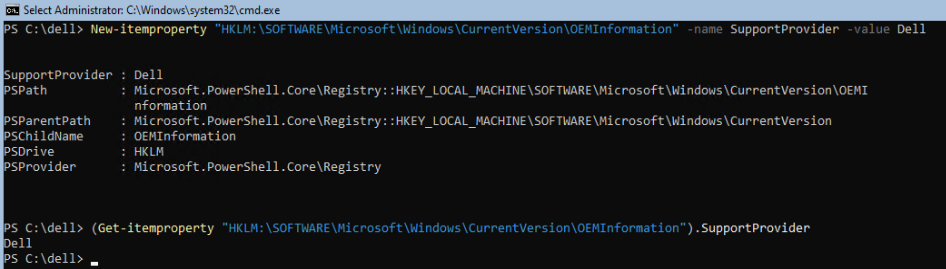
Run the following PowerShell command to add Dell as the OEM vendor.
New-itemproperty "HKLM:\SOFTWARE\Microsoft\Windows\CurrentVersion\OEMInformation" -name SupportProvider -value Dell
Verify the Setting
Execute this command to confirm the value was applied.
(Get-itemproperty "HKLM:\SOFTWARE\Microsoft\Windows\CurrentVersion\OEMInformation").SupportProvider
The output must display Dell .
Affected Products
AX Nodes, AX-640, ax-650, AX-6515, AX-740XD, AX-750, AX-7525Article Properties
Article Number: 000196954
Article Type: How To
Last Modified: 08 Apr 2026
Version: 8
Find answers to your questions from other Dell users
Support Services
Check if your device is covered by Support Services.