VxRail: Node Physical and Appliances Views Show Error "server type is not supported"
Summary: Some of the nodes in the cluster, the Physical and Appliances views reported "server type is not supported"
This article applies to
This article does not apply to
This article is not tied to any specific product.
Not all product versions are identified in this article.
Symptoms
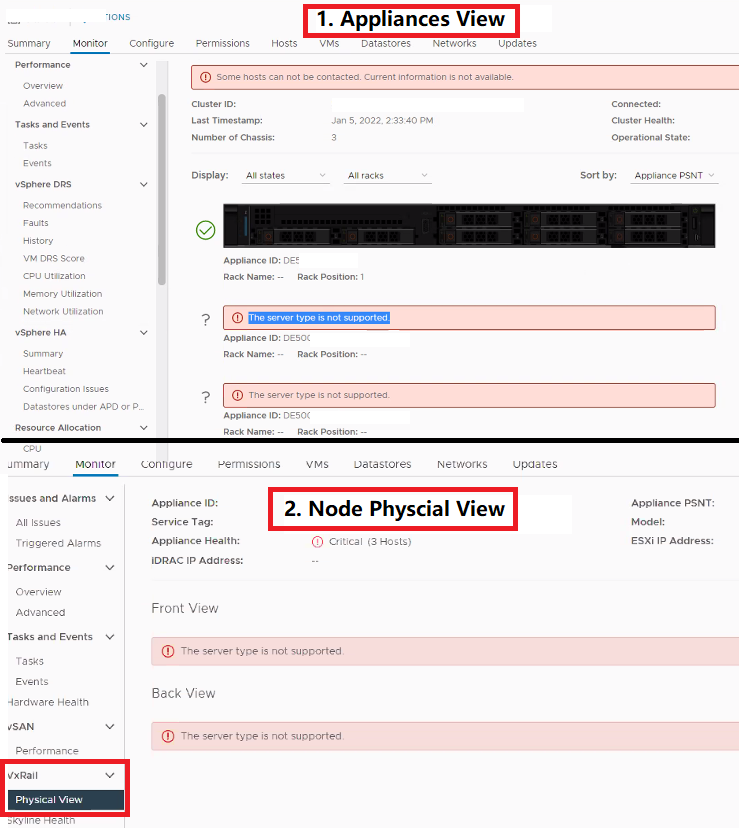
- SSH to the failing node. Check if the fru command correctly queries the Model and PSNT information.
[root@node-02:~] /opt/vxrail/tools/ipmitool fru print 17
 Chassis Type          : Rack Mount Chassis
 Chassis Part Number   : VxRail G560F
 Chassis Serial        : JLXXXXX
 Chassis Extra         : DE400XXXXXXX
- Log in to the iDRAC. Check the model name that is listed on the Dashboard page and that the iSM is running on the iDRAC.
iDRAC Settings --> OVerview --> iDRAC Service Module, status as running
- Check for warnings in the ESXi /var/run/log/platform_svc.log
2022-01-04T08:04:35Z platform_svc: [ThreadPoolExecutor-0_1] ERROR -   endpoints.error.Error: Failed call PTAgent API even with retry.base url: https://192.168.0.189:8086/api/PT/v1, uri: /host/inventory, method: post
2022-01-04T08:06:20Z platform_svc: [ThreadPoolExecutor-0_1] WARNING - Performed a request to PTagent faied. Base URL: https://192.168.0.189:8086/api/PT/v1, URI: /host/inventory
2022-01-04T08:06:21Z platform_svc: [ThreadPoolExecutor-0_1] INFO - Found PTagent Listen Address: [192.168.0.189:8086]
- SSH to the VRM. Verify the output of the following two commands. If there are multiple hosts, check them with the below commands:
curl -k --user USER_NAME:Password -X POST -H "Content-Type: application/json" -d '{}' https://Issue_node_ip_or_FQDN:8086/api/PT/v1/host/info

curl -k --user USER_NAME:Password -X POST -H "Content-Type: application/json" -d '{}' https://Issue_node_ip_or_FQDN:8086/api/PT/v1/host/swinventory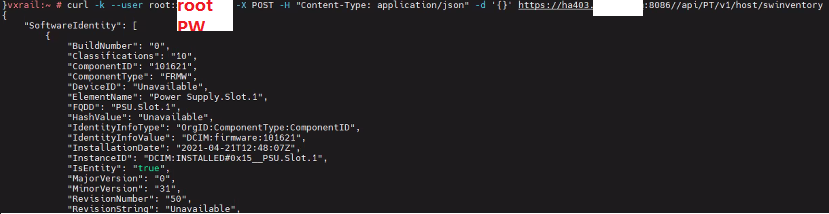
Cause
If VxRail Manager (VRM) can query node information after running the commands in step 5, then this means that there is no issue on the VRM.
PTAgent and Platform services may be unable to deliver node information to the VRM. The VRM fails to display the node information.
PTAgent and Platform services may be unable to deliver node information to the VRM. The VRM fails to display the node information.
Resolution
To resolve this issue, SSH to failing nodes and run the commands to restart DellPTA and Platform services.
The following commands apply to VxRail 7.x through 8.0.214, note that for 14G and above platforms after 7.0.240 there is no DellPTAgent anymore.
/etc/init.d/DellPTAgent restart
/etc/init.d/DellPTAgent startus

/etc/init.d/vxrail-pservice restart
/etc/init.d/vxrail-pservice startus
For VxRail 8.0.300+, run the following command to restart the Platform service and check the service status.
esxcli daemon control restart -s platformsvc

esxcli daemon info get -s platformsvc
Affected Products
VxRail, VxRail 460 and 470 Nodes, VxRail Appliance Series, VxRail G Series Nodes, VxRail D Series Nodes, VxRail D560, VxRail D560F, VxRail E Series Nodes, VxRail E460, VxRail E560, VxRail E560F, VxRail E560N, VxRail E660, VxRail E660F, VxRail E660N
, VxRail E665, VxRail E665F, VxRail E665N, VxRail G560, VxRail G560F, VxRail P Series Nodes, VxRail P570, VxRail P570F, VxRail P580N, VxRail P670F, VxRail P670N, VxRail P675F, VxRail P675N, VxRail S Series Nodes, VxRail S470, VxRail S570, VxRail S670, VxRail Software, VxRail V Series Nodes, VxRail V470, VxRail V570, VxRail V570F, VXRAIL V670F, VxRail VD-4510C, VxRail VD-4520C, VxRail VD Series Nodes, VxRail VE-660, VxRail VE-6615, VxRail VE-670, VxRail VP-760, VxRail VP-7625, VxRail VP-770, VxRail VS-760
...
Article Properties
Article Number: 000195061
Article Type: Solution
Last Modified: 06 Mar 2026
Version: 10
Find answers to your questions from other Dell users
Support Services
Check if your device is covered by Support Services.