Avamar: Administrator fails with "Invalid Certificate. Install a valid certificate and try again"
Summary: This article explains an issue when accessing the Avamar Administrator console.
This article applies to
This article does not apply to
This article is not tied to any specific product.
Not all product versions are identified in this article.
Symptoms
When attempting to log in to the Avamar Administrator console, the following error appears:
"Invalid Certificate. Install a valid certificate and try again. You can use the Java Control Panel to import certificate"
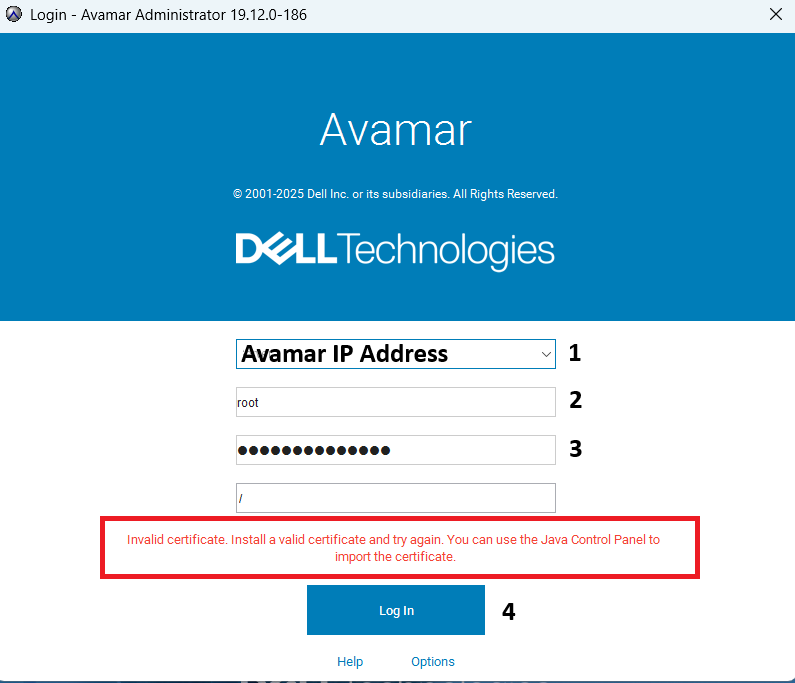
The log file /usr/local/avamar/var/mc/server_log/mcserver.log.0 shows:
08/06-12:08:29.00955 [RMI TCP Connection(647167)-10.xxx.xx.xxx#11555903] sun.rmi.transport.tcp.TCPTransport$ConnectionHandler.run0
FINE: RMI TCP Connection(647167)-10.xxx.xx.xxx: terminated with exception:
java.net.SocketException: Connection reset
        at java.net.SocketInputStream.read(Unknown Source)
        at java.net.SocketInputStream.read(Unknown Source)
        at com.rsa.sslj.x.ap.c(Unknown Source)
        at com.rsa.sslj.x.ap.a(Unknown Source)
        at com.rsa.sslj.x.ap.b(Unknown Source)
        at com.rsa.sslj.x.ap.b(Unknown Source)
        at com.rsa.sslj.x.al.read(Unknown Source)
        at java.io.BufferedInputStream.fill(Unknown Source)
        at java.io.BufferedInputStream.read(Unknown Source)
        at java.io.DataInputStream.readInt(Unknown Source)
        at sun.rmi.transport.tcp.TCPTransport$ConnectionHandler.run0(Unknown Source)
        at sun.rmi.transport.tcp.TCPTransport$ConnectionHandler.lambda$run$0(Unknown Source)
        at java.security.AccessController.doPrivileged(Native Method)
        at sun.rmi.transport.tcp.TCPTransport$ConnectionHandler.run(Unknown Source)
        at java.util.concurrent.ThreadPoolExecutor.runWorker(Unknown Source)
        at java.util.concurrent.ThreadPoolExecutor$Worker.run(Unknown Source)
        at java.lang.Thread.run(Unknown Source)
Cause
a { text-decoration: none; color: #464feb; } tr th, tr td { border: 1px solid #e6e6e6; } tr th { background-color: #f5f5f5; } The Avamar client/server authentication uses Java RMI, which depends on a properly functioning DNS service to operate correctly.
Resolution
- Log in to the Avamar server as admin.
- Edit the
/usr/local/avamar/var/mc/server_data/prefs/mcserver.xmlusingviorvim. - Replace the value on
rmi_over_ssltofalse.
<entry key="rmi_over_ssl" value="false"/>
- Restart the Management Console Service (MCS)
mcserver.sh --restart
- Resume the other services.
dpnctl start
NOTE: With RMI SSL disabled, passwords and application data are transmitted between the client and server in plain text.
Additional Information
Refer to similar article Avamar: Unable to Launch Avamar Administrator Jnlp with Java 1.8.0_481
Affected Products
AvamarArticle Properties
Article Number: 000191264
Article Type: Solution
Last Modified: 11 May 2026
Version: 7
Find answers to your questions from other Dell users
Support Services
Check if your device is covered by Support Services.