PowerStore: NDU Prestage action fails with timeout
Summary: This article covers the steps to overcome an NDU Prestage action failure with timeout error while running a cluster software upgrade (NDU) to a PowerStore cluster.
This article applies to
This article does not apply to
This article is not tied to any specific product.
Not all product versions are identified in this article.
Symptoms
Before a PowerStore cluster upgrade package can be installed, it has to be prestaged on the appliance. This Prestage action includes extracting the contents of the upgrade package and placing it into the installation folder on both nodes of the appliance. This Prestage action usually takes only 10 to 15 minutes to complete.
If the Prestage action takes more than 30 minutes, then this action may fail with a timeout error. The PowerStore Manager Job Details of the Prestage action shows the status of Failed along with the error message:
Example:
Job Details screen of a Prestage action failure showing this timeout error message.
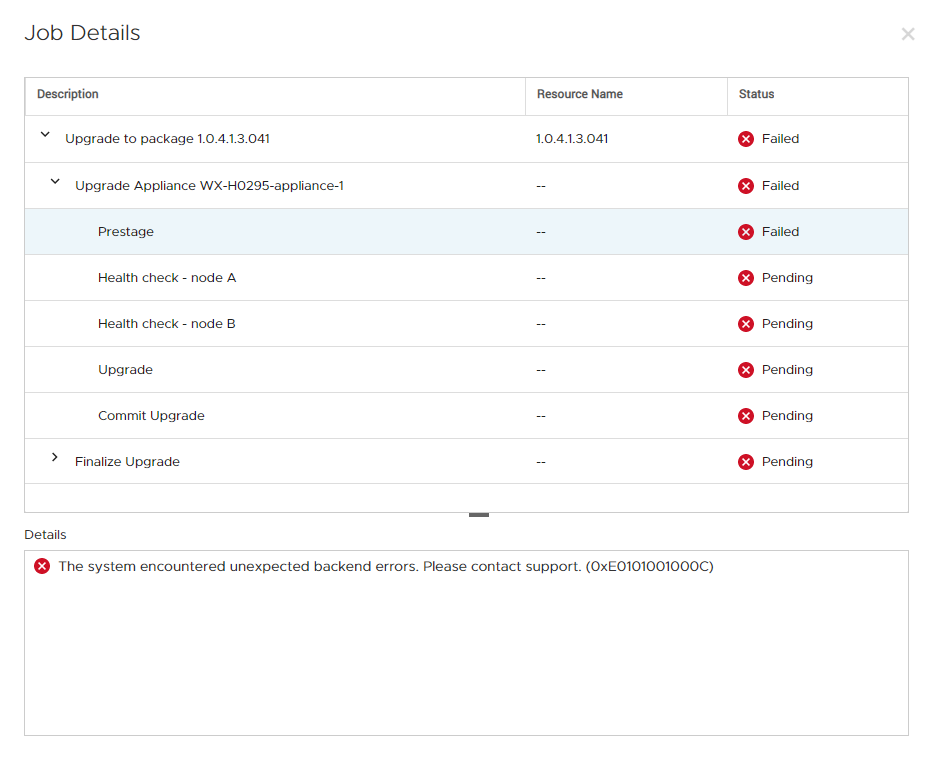
If the Prestage action takes more than 30 minutes, then this action may fail with a timeout error. The PowerStore Manager Job Details of the Prestage action shows the status of Failed along with the error message:
The system encountered unexpected backend errors. Please contact support.
Example:
Job Details screen of a Prestage action failure showing this timeout error message.
Cause
Increased activity on the system can slow down the Prestage action which may lead to such timeout error when upgrading the PowerStore cluster.
Resolution
When encountering this error message, before contacting support, try the upgrade again. If the issue persists, escalate to Technical Support for further assistance.
Important: Ensure that the upgrade is performed when activity is at its minimum.
Important: Ensure that the upgrade is performed when activity is at its minimum.
Affected Products
PowerStoreArticle Properties
Article Number: 000182392
Article Type: Solution
Last Modified: 13 Jun 2025
Version: 2
Find answers to your questions from other Dell users
Support Services
Check if your device is covered by Support Services.