Precision 5810 and 5820 Intermittently Stop Responding with Error "0XD1 - DRIVER_IRQL_NOT_LESS_OR_EQUAL"
Summary: Learn more about an intermittent issue seen on the Precision 5810 and 5820 fixed workstations. They intermittently stop responding and display an on-screen error with a Driver IRQL not less or equal to the error for the iaStorB.sys driver. ...
This article applies to
This article does not apply to
This article is not tied to any specific product.
Not all product versions are identified in this article.
Symptoms
Precision 5810 and 5820 Towers intermittently fail with 0X000000D1 STOP error against the iaStorB.sys driver. The reports states that the tower intermittently stops responding and displays the following on-screen error message:
The iaStorB.sys driver is causing a 0X000000D1: DRIVER_IRQL_NOT_LESS_OR_EQUAL error.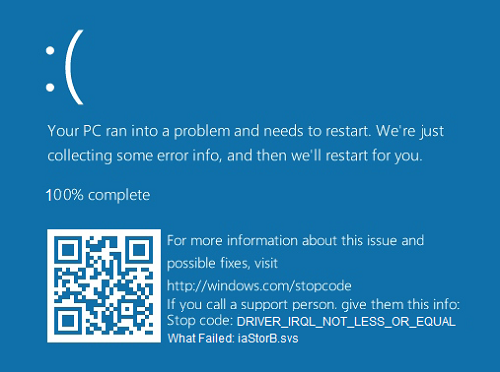
Affected Platforms:
- Precision 5810
- Precision 5820
Cause
This section is not applicable to this article.
Resolution
Note: Administrator rights on the laptop are required to make any operating system changes or update any software.
Updating to the latest version of the Intel Rapid Storage Technology (IRST) Enterprise Driver available from the support site resolves the problem. To download and install the latest updated version, follow these instructions:
Precision 5810 Tower Fixed Workstation:
Update the storage controller driver to Intel Rapid Storage Technology Driver and Management Console, version 5.5.4.1037, A09 or later. To download and install the Intel-Rapid-Storage-Technology-Driver-and-Management_2206F_WIN_5.5.4.1037_A09_05.exe file, see:
Precision 5820 Tower Fixed Workstation:
Update the storage controller driver to Intel Rapid Storage Technology enterprise F6 Driver, version 5.3.1.1031, A05 or later. To download and install the Intel-Rapid-Storage-Technology-enterprise-F6-Driver_558DN_WIN_5.3.1.1031_A05_02.exe file, see:
Affected Products
Precision 5820 Tower, Precision Tower 5810Article Properties
Article Number: 000177929
Article Type: Solution
Last Modified: 26 Jun 2026
Version: 9
Find answers to your questions from other Dell users
Support Services
Check if your device is covered by Support Services.