VxRail: vSAN Performance Diagnostics is stuck loading and not populating
Summary: vSAN Performance Diagnostics is stuck loading and not populating.
This article applies to
This article does not apply to
This article is not tied to any specific product.
Not all product versions are identified in this article.
Symptoms
vSAN Performance Diagnostics keeps loading indefinitely without populating.
Cause
Required Prerequisites for vSAN Performance Diagnostics:
- The vSAN performance service must be turned on.
- vCenter Server requires Internet access.
- The "Customer Experience Improvement Program (CEIP)" must be enabled.
Resolution
To resolve this issue:
- Enable vSAN Performance Service:
- Browse vSAN cluster
- Click the Configure tab.
For vSphere UI client, follow the below procedure:
- Under vSAN, select Services.
- Click the Performance Service Edit button
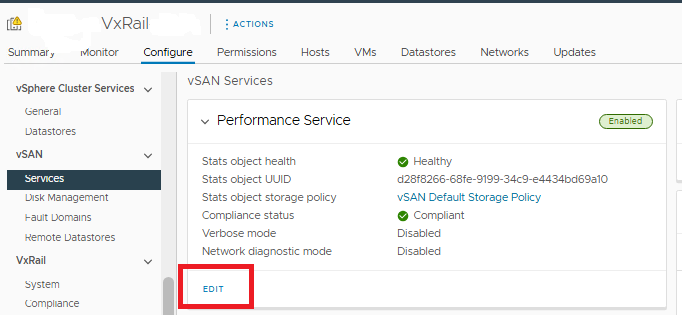
- Click to enable vSAN Performance Service.
- Select a storage policy for the Stats database object.
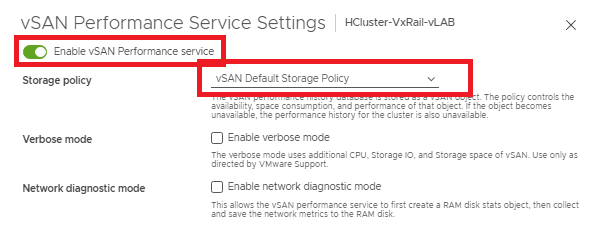
- Click Apply.
----------------------------------------------
- Confirm Internet Access:
- Check for vCenter Internet access and firewall allowance.
- SSH to vCenter and ping 8.8.8.8 and confirm that the ping is working.
----------------------------------------------
- Enable CEIP:
- Log in to the vCenter Client.
- On the vSphere Client home page, under Administration, click Customer Experience Improvement Program.
- Click Join to enable the CEIP or Leave to disable the Program.
vSAN Performance Diagnostics should now be working.
Article Properties
Article Number: 000078416
Article Type: Solution
Last Modified: 18 Apr 2026
Version: 8
Find answers to your questions from other Dell users
Support Services
Check if your device is covered by Support Services.