Monitor Turns to a Black Screen When USB-C Prioritization Changes from High Data Speed to High Resolution
Summary: A ThinOS device connects to a monitor with a USB-C prioritization feature turns to black when changing the configuration from "High Data Speed" to "High Resolution."
This article applies to
This article does not apply to
This article is not tied to any specific product.
Not all product versions are identified in this article.
Symptoms
Affected Platforms:
- Dell Wyse 5070
- Dell Wyse 5470
Affected Products:
All monitors that support USB-C Prioritization:
- U4320Q
- U2520D
- U2421HF
- U2721DE
- U2421E
- U2422H
- U2422HE
- U2722D
- U2722DE
- P3222QE
- C2722DE
Affected Operating Systems:
- Dell ThinOS
Sample: USB-C Prioritization image - from U2520D monitor user guide
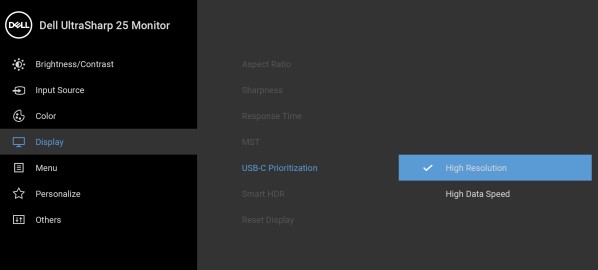
How to Reproduce steps and behavior:
- Connect a monitor which has a USB-C prioritization feature to a DELL Wyse 5070 thin client USB type C port using a Type-C to Type-C cable.
- Power on the thin client and wait for the ThinOS desktop to display on the monitor properly.
- Press the monitor On Screen Display (OSD) menu and select USB-C prioritization.
- Change the setting from High Data Speed to High Resolution.
- The monitor screen turns black, and the OSD shows that there has been no USB-C signal input detected. This is the reason why the video cannot be displayed.
Cause
ThinOS firmware does not support USB-C prioritization (this is due to the USB Type-C Connector System Software Interface (UCSI) specification). Hence, when the USB-C prioritization setting changes, the ports link training cannot properly establish to present the video on the monitor screen.
Resolution
Work around
Force the thin client to restart.
Log term solution:
ThinOS 2311 (9.4.4106) or later resolves this issue.
Affected Products
Dell 27 Video Conferencing Monitor C2722DE, Dell P3222QE, Dell U2421E, Dell U2421HE, Dell U2422H, Dell U2520D, Dell U2721DE, Dell U2722D, Dell U2722DE, Dell U4320Q, Wyse 5070 Thin Client, Wyse 5470 All-In-One, Wyse 5470, Dell ThinOSArticle Properties
Article Number: 000194575
Article Type: Solution
Last Modified: 12 May 2026
Version: 10
Find answers to your questions from other Dell users
Support Services
Check if your device is covered by Support Services.