Service Tag, Product ID Search Error, or Part Number Results
Summary: Learn how to fix issues searching for a Dell Service Tag, Express Service Code, Product ID, Serial Number, or Part Number returns no results.
This article applies to
This article does not apply to
This article is not tied to any specific product.
Not all product versions are identified in this article.
Instructions
Problem Description (Symptoms)
Users may experience one or more of the following:
- Entering a Service Tag or Product ID returns no matching product
- Error message such as:
- "We couldn’t find your product"
- Part number or Serial Number search does not return expected support content
NOTE: For information about finding your Service Tag, see our Find your Service Tag or Serial Number library page.
Root Causes
Common causes include:
- Incorrect input format
- Typographical errors can occur when entering the Service Tag. The Service Tag (ST) is a 7-character alphanumeric code. The Express Service Code (EX) is a numeric conversion of the Service Tag (ST). See Figure 1 as an example.
- Adding extra text (for example, "ST," "Service Tag")

Figure 1: Example of Service Tag label
- Product data not yet indexed
- Newly purchased devices may take 1–2 days to appear in Dell systems
- Legacy or unsupported products
- Older devices may no longer be fully indexed or supported
- Browser/session issues
- Cached data or temporary glitches affecting lookup
- Incorrect lookup method
- Using part number where Service Tag is required
Resolution (Step-by-Step)
Step 1: Validate the Identifier
- Ensure the Service Tag:
- Is entered correctly as a 7-character alphanumeric code (Figure 2).
- Contains no additional words or spaces

Figure 2: Example of Service Tag label
Step 2: Try Alternate Identification Methods for Computers
- Browse to the Dell Support Site
- Use the detect this PC automatically function next to the Search box Figure 3 (green box).
- Use the Browse All Products tool to manually browse product categories, Figure 3 (see blue box).
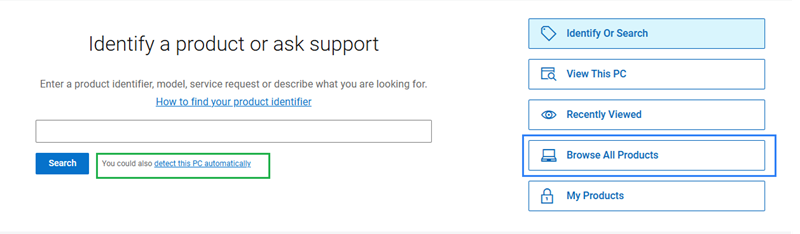
Figure 3: Browse All Products
Step 3: New or Old Devices
- New product - Wait 24–48 hours and retry.
- Older products - Browse to the Dell Support Site and use the Browse All Products tool to manually browse product categories, Figure 4 (see blue box).
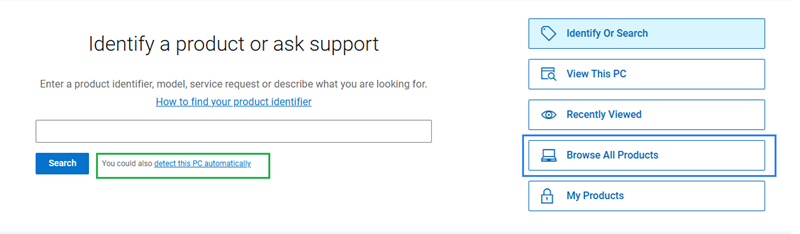
Figure 4: Browse All Products
Step 4: Browser Troubleshooting
Perform the following:
- Refresh the page by using the F5 key or pressing and holding the Ctrl key, and them pressing the R key.
- Retry after a few minutes
- Use a different browser
- Clear browser cache and cookies
Step 5: Part Number Lookup Guidance
- For technical support → use Service Tag
- For replacement parts:
- Use Dell Parts & Accessories tools
Additional Information
How To Locate Your Service Tag
Duration: 00:36
When available, closed caption (subtitles) language settings can be chosen using the Settings or CC icon on this video player.
Affected Products
Chromebox, Alienware, Dell All-in-One, Dell Pro All-in-One, Dell Pro Max Micro, Dell Pro Max Slim, Dell Pro Max Tower, Dell Pro Micro, Dell Pro Slim, Dell Pro Tower, Dell Slim, Dell Tower, Inspiron, Legacy Desktop Models, OptiPlex, Vostro, XPS
, G Series, Alienware and Dell Gaming Monitors, C Series, E Series, P Series, S Series, SE Series, UltraSharp Premier (UP) Series, UltraSharp (U) Series, Dell Monitors, Dell Plus Monitors, Dell Pro Plus Monitors, Chromebook, G Series, Alienware, Dell Laptops, Dell Plus, Dell Pro, Dell Pro Max, Dell Pro Plus, Dell Pro Premium, Inspiron, Latitude, Dell Pro Rugged, Vostro, XPS, Legacy Laptop Models, SupportAssist, Fixed Workstations, Mobile Workstations, Dell Pro Max Micro XE FCM2250, Dell Pro Max Slim XE FCS1250, Dell Pro Max Tower T2 XE FCT2250, Dell Pro Max 16 XE MC16250, Dell Pro Micro Plus XE QBM1250, Dell Pro Slim Plus XE5 QBS1250, Dell Pro Tower Plus XE5 QBT1250
...
Article Properties
Article Number: 000196860
Article Type: How To
Last Modified: 24 Jun 2026
Version: 24
Find answers to your questions from other Dell users
Support Services
Check if your device is covered by Support Services.