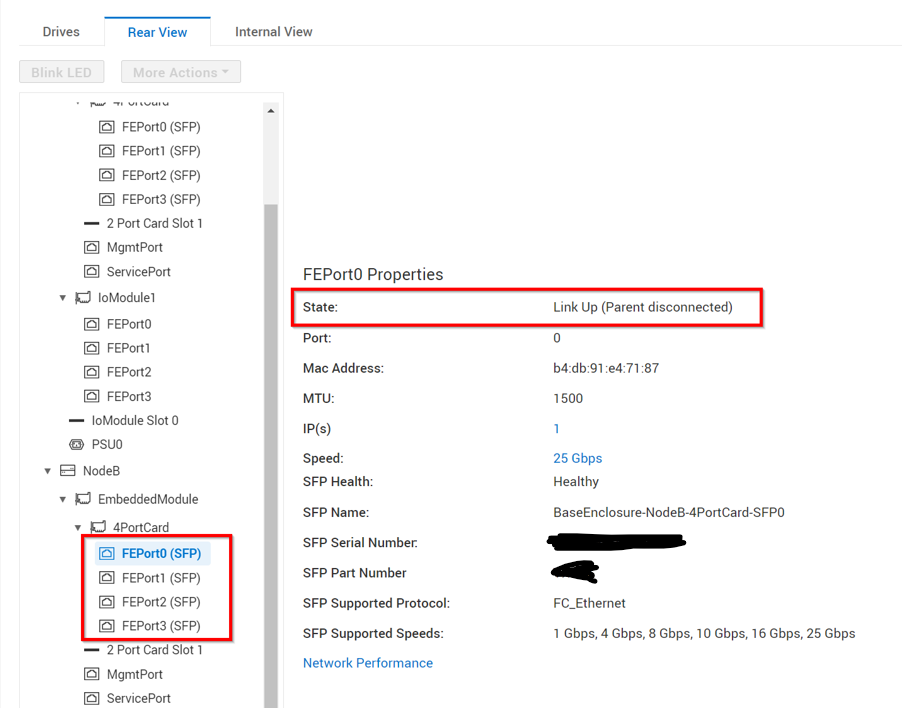
PowerStore: False Port State attribute of "Link Up (Parent disconnected)" in the PowerStore Manager Port Properties
Summary: A false Port State attribute of "Link Up (Parent disconnected)" may be listed in the PowerStore Manager (GUI) Port Properties report.
This article applies to
This article does not apply to
This article is not tied to any specific product.
Not all product versions are identified in this article.
Symptoms
The PowerStore Manager Port Properties reports may display a Port State attribute of "Link Up (Parent disconnected)" that is not aligned with the real port state.
Note: This issue affects all PowerStoreOS releases.
Cause
Issue may occur when a dedicated System Manager Module (SYM) data polling and a scheduled SYM data polling are overlapping. This overlap may lead to a mismatch inside the Management Database.
Resolution
This issue was resolved in PowerStoreOS version 4.1 (or later).
Workaround:
With earlier versions, contact Dell Technical Support to confirm that this issue has occurred. Reference this KB Article in the Service Request for expedited handling.
Affected Products
PowerStoreArticle Properties
Article Number: 000253574
Article Type: Solution
Last Modified: 14 Jun 2025
Version: 4
Find answers to your questions from other Dell users
Support Services
Check if your device is covered by Support Services.