NVP vProxy: VM backups saturating VRNI value
Summary: VMware environment uses vRealize Network Insight (VRNI). The VRNI flows are being exceeded.
This article applies to
This article does not apply to
This article is not tied to any specific product.
Not all product versions are identified in this article.
Symptoms
vRealize Network Insight shows that the flow capacity is being exceeded.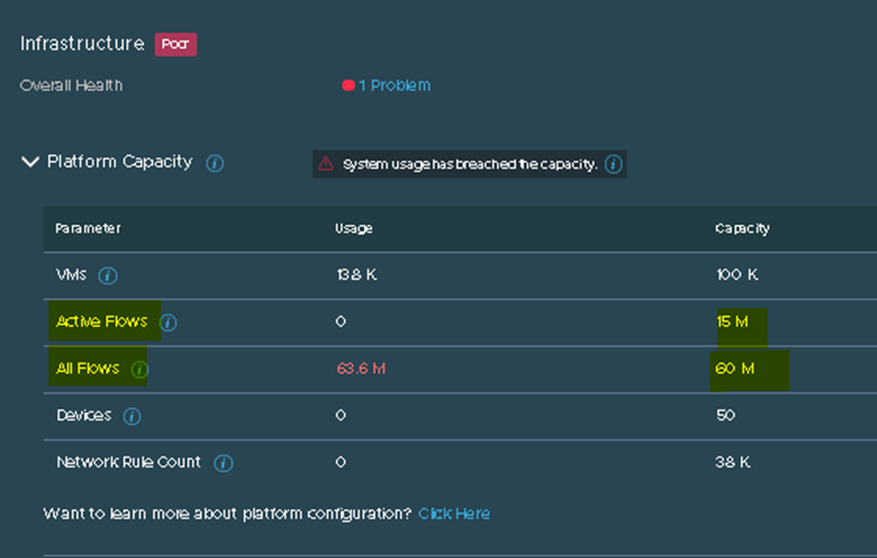
Cause
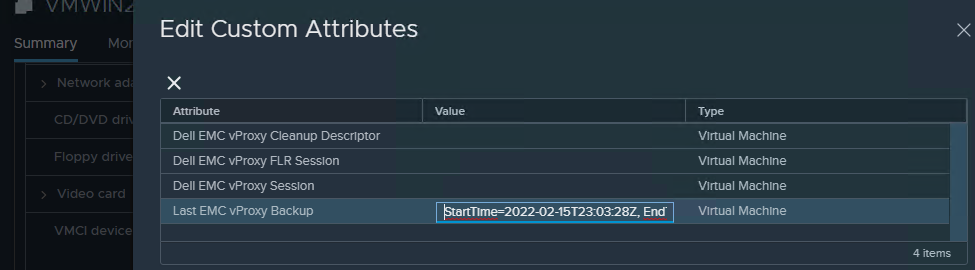
VMware support has determined that the biggest contributor to this is the "custom attributes" field for each Virtual Machine (VM) in VMware.
During each backup, the custom attribute "Last EMC vProxy Backup" is changed when the backup starts and finishes to show the start and end times:
Resolution
There is no method of performing NetWorker VM image backups without modifying this field.
Request For Enhancement (RFE) ticket NW-I-1891 has been opened. The objective of the RFE is to have VM backups which run without modifying the VM custom attributes. To track this RFE, contact your Dell Site Account or Sales team with regarding NW-I-1891.
Affected Products
NetWorkerProducts
NetWorker Family, NetWorker SeriesArticle Properties
Article Number: 000196407
Article Type: Solution
Last Modified: 19 Mar 2025
Version: 2
Find answers to your questions from other Dell users
Support Services
Check if your device is covered by Support Services.