VxRail: vSAN shows "Advanced Virtual SAN configuration in sync" error
Summary: vSAN Health tab shows "Advanced Virtual SAN configuration in sync" due to mismatched ESXi versions.
This article applies to
This article does not apply to
This article is not tied to any specific product.
Not all product versions are identified in this article.
Symptoms
vSAN Health tab shows the following error: "Advanced Virtual SAN configuration in sync"
Cause
This issue is reported due to a difference in the ESXi versions or builds on hosts.
Resolution
- After configuring a stretched cluster, if this error is reported over the witness appliance. Follow KB 498075 VxRail: After a Stretched cluster is configured, the vSAN health test will fail with "Advanced Virtual SAN configuration in sync" to resolve.
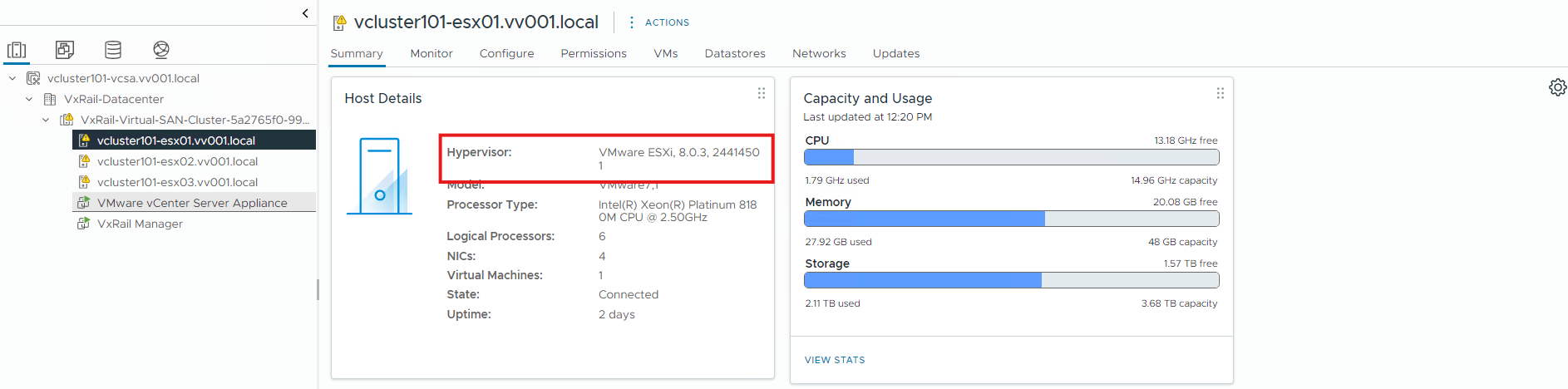
- In case this is not a stretched cluster, check that all ESXi hosts have the same version (to identify the version, follow the steps below). If not, upgrade the cluster again to the current version from VxRail Manager. The upgrade script should skip the updated ESXi hosts and upgrade the ones reporting a different version
To check the versions and build numbers, run the following command on each host:
# vmware -vl The version can also be checked from vSphere by selecting the host and viewing the Summary tab:
Additional Information
For additional information see: https://knowledge.broadcom.com/external/article/327010/vsan-health-service-cluster-health-adv.html

Products
VxRail, VxRail Appliance Series, VxRail SoftwareArticle Properties
Article Number: 000027237
Article Type: Solution
Last Modified: 21 Feb 2025
Version: 4
Find answers to your questions from other Dell users
Support Services
Check if your device is covered by Support Services.