Unisphere for PowerMax: How to verify PowerMax/VMAX single path device
Summary: How to verify PowerMax or VMAX single path devices using Unisphere for PowerMax?
This article applies to
This article does not apply to
This article is not tied to any specific product.
Not all product versions are identified in this article.
Instructions
Sometimes users must verify if there are any risks for single path devices before doing maintenance (FRU replacement), Online Configuration Changes, Online Firmware Upgrade, and so forth.
When the user gets the single path devices list from Dell EMC, the user must determine which host the devices are mapping to. With Unisphere masking view volume paths, they can verify the active paths for host volumes.
The active paths are viewed using Unisphere Array > Hosts > Masking Views > select Masking Views > click View Path Details > Masking View Volume Paths.
For a specific volume number, search the director ports and count the number of Logged In which are checked. This way, we can find out how many active paths are logged into the host. The user can find and review single path devices from the list.
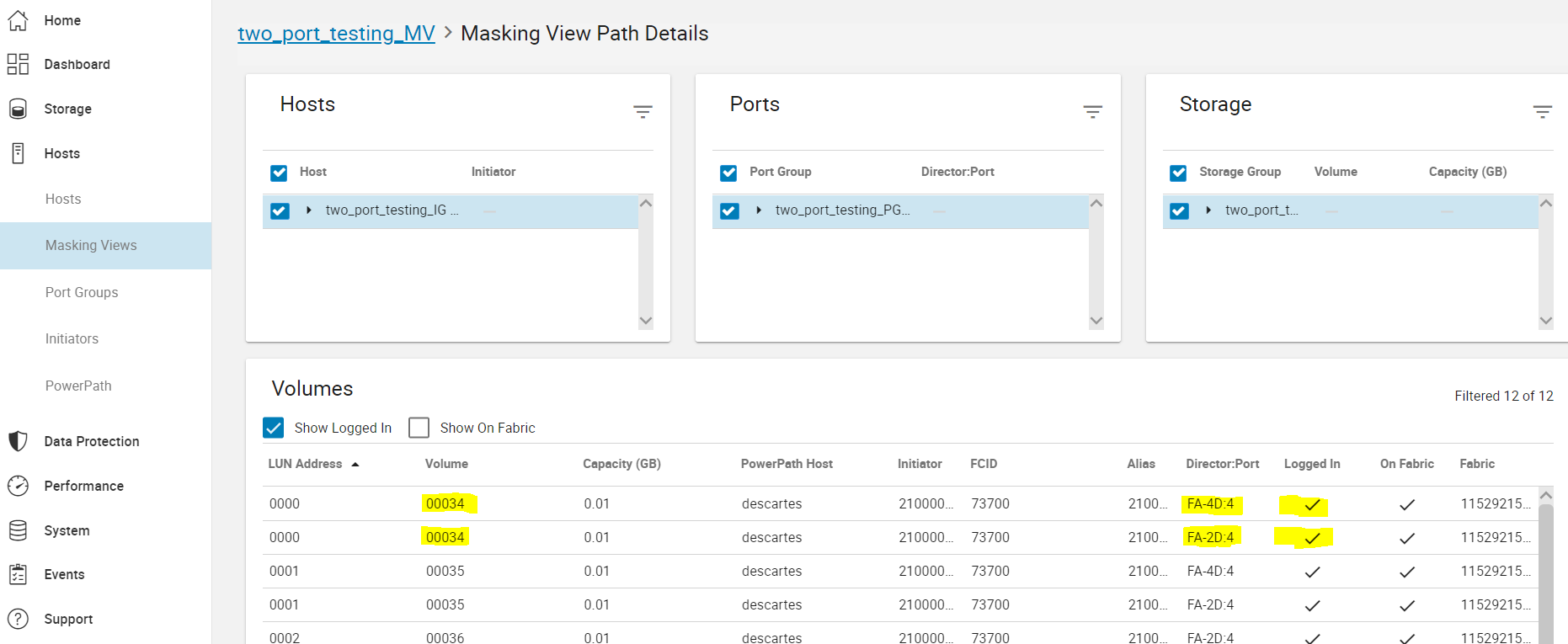
Logged In
Indicates if the initiator is logged into the host or target.
On Fabric
Indicates if the initiator is zoned in and on the fabric.
Affected Products
PowerMax, Unisphere for PowerMax, VMAX All Flash, VMAX3 SeriesArticle Properties
Article Number: 000191962
Article Type: How To
Last Modified: 27 Mar 2026
Version: 7
Find answers to your questions from other Dell users
Support Services
Check if your device is covered by Support Services.