PowerStore Alerts: System Data Capacity Alerts
요약: This article discusses appliance system data storage capacity.
이 문서는 다음에 적용됩니다.
이 문서는 다음에 적용되지 않습니다.
이 문서는 특정 제품과 관련이 없습니다.
모든 제품 버전이 이 문서에 나와 있는 것은 아닙니다.
증상
When the PowerStore encounters an issue, an error alert is generated to help identify the issue.
This article explains the different possible causes and the relevant solutions for these error alerts.
If your issue is not resolved despite the solution that is provided, check the technical support contact options.
This article explains the different possible causes and the relevant solutions for these error alerts.
If your issue is not resolved despite the solution that is provided, check the technical support contact options.
원인
The cause is described in the resolution section for respective alerts.
For an explanation of how Physical Capacity is calculated, see KB article188491: PowerStore: How PowerStore Physical Capacity is calculated.
For an explanation of how Physical Capacity is calculated, see KB article188491: PowerStore: How PowerStore Physical Capacity is calculated.
해결
| Alert Text | The capacity utilization of appliance's system data is above 90 percent. The capacity utilization of appliance's system data is above 95 percent. The appliance's data system has reached full capacity. |
||||||||||||||||||||||||||||||||
| Error Code | (0x00201601) (0x00201604) (0x00201602) |
||||||||||||||||||||||||||||||||
| Alert ID | DATA_PATH_SYSTEM_DATA_CAPACITY_UTILIZATION_ABOVE_90_PERCENT DATA_PATH_SYSTEM_DATA_CAPACITY_UTILIZATION_ABOVE_95_PERCENT DATA_PATH_SYSTEM_DATA_CAPACITY_UTILIZATION_100_PERCENT |
||||||||||||||||||||||||||||||||
| Resolution |
CausePowerStore appliance requires space for its internal system data. The system preallocates space upon initialization, and expands system space as required. User space is allocated by demand. The space used to expand System or User Data is known as Expandable Capacity (capacity which can be used to expand either System or User Data). User Data space can expand and shrink (meaning capacity that is released from User Data may be repurposed for System Data). So for example, you may have a PowerStore with 100 TB allocated for user data, however it may only be using 60 TB of that space and 40 TB can be repurposed for either User Data or System Data.
A PowerStore was configured with a 100 TB total physical capacity appliance. At some point in time:
Solution
If you receive any of the above alerts, examine first the Total Physical Capacity Used as shown in the PowerStore UI under Capacity Dashboard.
In the example below, the Appliance has 1.5% Total Physical Capacity used: 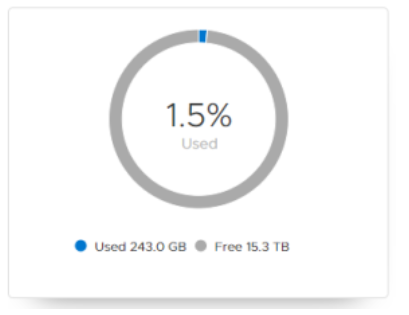
For appliances running releases below PowerStoreOS 4.1.0, follow the guidelines below:
For appliances running PowerStoreOS 4.1.0 and above, follow the guidelines below:
Guidelines
|
해당 제품
PowerStore문서 속성
문서 번호: 000123354
문서 유형: Solution
마지막 수정 시간: 16 6월 2025
버전: 16
다른 Dell 사용자에게 질문에 대한 답변 찾기
지원 서비스
디바이스에 지원 서비스가 적용되는지 확인하십시오.