1. Processing Power
2. Graphics Capability
3. Display Quality
4. Memory and Storage
Choosing the right computer is essential for designers who need powerful performance and accurate visuals. Here are key aspects to consider when selecting a computer for design work.
1. Processing Power
2. Graphics Capability
3. Display Quality
4. Memory and Storage

A high-performance desktop featuring Intel Core Ultra 7 processor and AMD Radeon Pro W7500 graphics.

A business laptop featuring Intel Core Ultra processor, AI-powered performance, and a 16" FHD+ anti-glare display.

A 37.5-inch WQHD+ curved monitor with IPS Black panel and 21:9 aspect ratio for immersive viewing.

A sleek, durable laptop featuring an AMD Ryzen AI 7 processor, 16GB DDR5 memory, and 512GB SSD.

A powerful workstation with Intel Core Ultra processors, NVIDIA graphics, and a 120Hz QHD+ display.

A powerful workstation featuring an Intel Core Ultra 7 processor, NVIDIA RTX Pro graphics, and QHD+ OLED display.
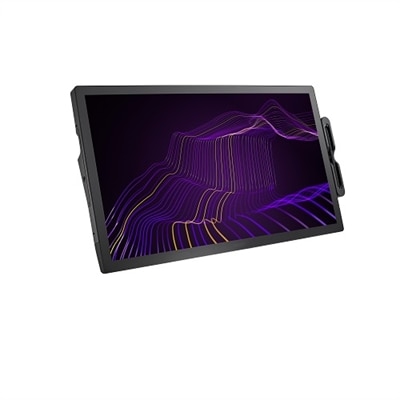
A 27" 4K pen display with 120Hz refresh rate, customizable pen, and 99% Adobe RGB coverage.
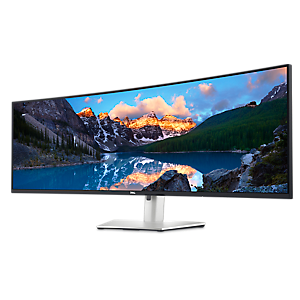
An immersive 49-inch dual QHD monitor with IPS Black panel and eco-friendly, arsenic-free glass.

A 42.5'' 4K monitor with multi-PC connectivity and four unique FHD partitions for enhanced productivity.

A durable, sleek laptop featuring AMD Ryzen AI Pro and advanced AI tools for enhanced business productivity.
Designers should prioritize a high-resolution display with accurate color reproduction, a powerful processor, ample RAM (at least 16GB), dedicated graphics, and fast storage such as SSDs to ensure smooth performance when running design software.
A dedicated graphics card accelerates rendering and processing of complex visuals, which is essential for tasks like 3D modeling, video editing, and working with large files in graphic design applications.
For most professional design tasks, at least 16GB of RAM is recommended. However, for intensive work such as video editing or 3D rendering, 32GB or more can provide even better performance.
Yes, a higher screen resolution allows designers to see finer details and work more accurately. Displays with at least Full HD (1920x1080) resolution are recommended, but many professionals prefer QHD or 4K screens for even greater clarity.
Both Windows and macOS offer robust support for design software. The choice often depends on personal preference and specific software requirements. Many popular design applications are available on both platforms.


Add the products you would like to compare, and quickly determine which is best for your needs.


