

Endpoint Security
ThinOS: A Smarter Path to Extending Endpoint Lifecycles
Experience enhanced security, streamlined management and seamless access to virtual environments with ThinOS.
Key takeaways:
-
- ThinOS 10 expands install options across new and existing Dell and non-Dell devices, giving IT organizations more choice in which workloads to virtualize.
- Repurposing PCs extends lifecycles, reduces e-waste and controls costs while central management with Wyse Management Suite streamlines operations.
- A closed, hardened thin client OS with modern browser options and broad ecosystem support helps protect regulated environments.
In Virtual Desktop Infrastructure (VDI) and Desktop-as-a-Service (DaaS) environments, ensuring high security is critical and it all starts at the endpoint. We are committed to strengthening security through our ongoing investment in Dell ThinOS, ensuring the platform evolves with our customers’ needs. ThinOS is the industry’s most secure thin client operating system,¹ purpose-built for virtual computing and cloud workspaces.
With the August 2025 release, ThinOS 10 introduced expanded device compatibility, so ThinOS can be installed on many new or existing Dell or non-Dell PCs and thin clients. By deploying ThinOS across a wider range of devices, IT teams can protect their investments, streamline IT management, and accelerate their transition to modern, secure computing environments.
Repurpose vs refresh
Dell ThinOS reframes refresh as a strategic choice—not a forced replacement. IT teams can reimage hardware that meets minimum requirements with ThinOS 10, turning existing devices into secure, high-performing endpoints optimized for VDI and DaaS.
This strategy provides several significant benefits:
-
- Maximize ROI: Extend fleet lifespan to increase lifetime value and avoid premature refresh. For example, businesses can extend the life of devices impacted by the end of support for Windows 10. This approach maximizes their investment by keeping those devices in service longer, ensuring continued productivity.
- Drive efficiency in a volatile market: When budgets tighten or component prices fluctuate, repurposing existing devices helps control spending and smooth out refresh cycles. In this context, ThinOS enables organizations to stretch their existing fleet further and better navigate unpredictable market conditions.
- Advance sustainability goals: Repurposing older endpoints helps reduce e-waste and supports circular practices. As noted by Forrester,² “Hardware providers are embracing…material reuse [models] to extend product lifecycles and reduce environmental impact.” ThinOS offers an alternative to a refresh, allowing companies to maximize existing inventory and reduce their environmental impact.
- Simplify management with centralized control: ThinOS includes management capabilities delivered via Wyse Management Suite (WMS), a tool specifically designed for VDI endpoints. This makes it easy for IT teams to modernize faster and stretch budgets further—while ensuring endpoints are aligned to the performance, security and manageability demands of modern digital workspaces.
- Enjoy a simplified, consistent experience: End users can continue working the way they always do, with no disruption or learning curve. Devices converted with ThinOS connect directly into the organization’s existing VDI environment preserving the same workflows and interfaces users already rely on.
- Seamless integration: With ThinOS 10, organizations can rapidly standardize and seamlessly integrate existing devices across merged environments, streamlining operations.
By leveraging Dell ThinOS to repurpose devices, organizations can embrace innovation, drive sustainability and maximize the value of their existing hardware investments. All while delivering reliable, secure access to modern virtual workspaces.
Spotlight: Fireside chat “Dell ThinOS Beyond the Box”
Interested in learning more about the evolution of ThinOS and what the latest release means for modern VDI environments? This fireside chat, led by industry analyst Gabe Knuth alongside Dell product experts, highlights the expanded software and device support in ThinOS 10 and shares real‑world examples of how organizations are using device repurposing to boost security, simplify management, and extend hardware value.
Watch the on‑demand session here
-
Easily identify devices eligible for ThinOS conversion
With the latest ThinOS release, device eligibility has expanded significantly. It now extends across a wide range of Dell and non-Dell endpoints. And because flexibility only matters if it’s easy to act on, Dell provides straightforward tools that help organizations quickly assess, validate and onboard devices for ThinOS conversion.
Here’s how IT teams can streamline the process from evaluation to large‑scale deployment:
-
- Start with the ThinOS 10 Hardware Compatibility List (HCL): This list outlines all Dell systems and third‑party devices that have been tested and validated for ThinOS conversion. It’s the fastest way to understand which devices are fully supported before moving into hands‑on evaluation.
-
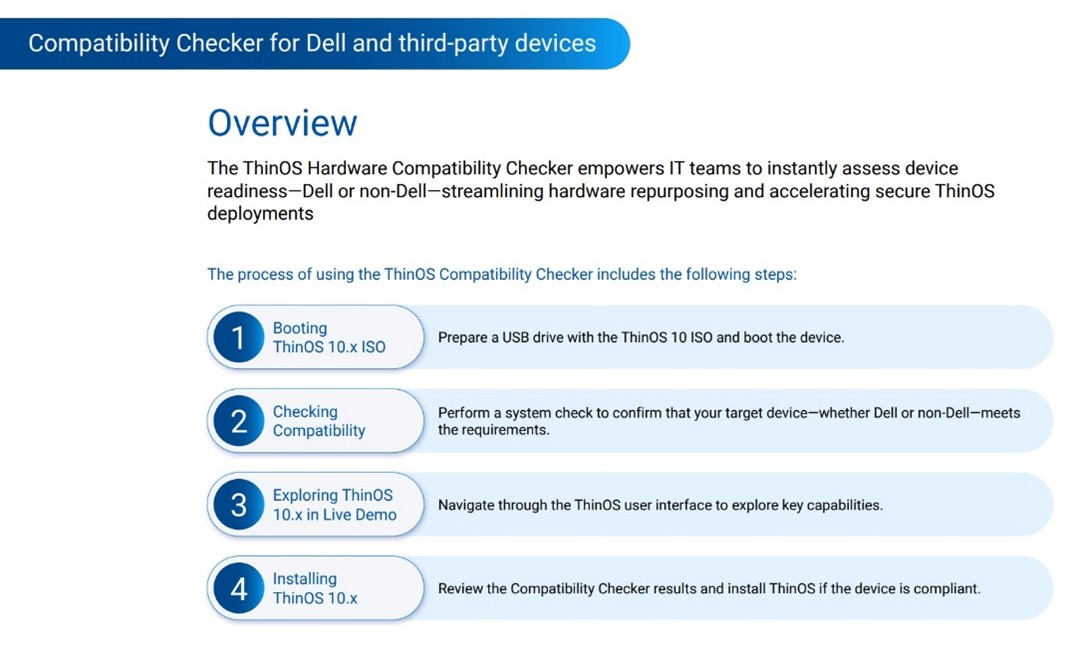
- Use the ThinOS Compatibility Checker for fast validation: Even if a device appears on the HCL, the checker gives a fast, simple way to verify that the device meets the minimum configuration requirements.
-
- Test the device right away: Once a device passes compatibility checks, the tool allows administrators to reimage the device or launch ThinOS in live boot mode. This makes it easy to test real workflows, verify performance and ensure peripheral compatibility.
-
- Automatic enrollment after conversion: When a device is converted to ThinOS, it automatically checks in to Wyse Management Suite (WMS) and receives the appropriate configurations and policies. This removes manual setup steps and accelerates time‑to‑
-
- Scale confidently with centralized management: When it’s time to move beyond pilot testing, mass deployment options with WMS make it simple to convert and manage large fleets of devices, even across distributed locations.
Dell ThinOS security advantage
Dell ThinOS delivers robust protection through a closed architecture that dramatically reduces the attack surface compared to general-purpose operating systems. This secure design meets the strict security and compliance requirements of regulated industries ,such as healthcare, finance, and government, while also supporting organizations that enforce rigorous internal security controls.
The latest ThinOS release expands device and application support without compromising security. Get the full details on the locked‑down desktop experience in the ThinOS Security Brief.
Strengthen the workspace strategy with ThinOS
For organizations exploring how to modernize end-user computing while minimizing budget impact and operational complexity, ThinOS offers a clear path forward. With broad device compatibility, centralized management through Wyse Management Suite, and a security-first design, ThinOS allows IT teams to convert existing devices into secure, high-performing endpoints for VDI and DaaS.
This approach not only helps maximize ROI and support sustainability goals, but also delivers a consistent user experience aligned with today’s virtual computing environments. With ThinOS, organizations can extend the value of their endpoint investments while confidently supporting the evolving demands of the modern workforce.
Looking for a deeper view into what Dell ThinOS can deliver? Explore benefits and device options on Dell.com.
1Based on Dell analysis of Dell ThinOS in Appliance Mode vs. competitive products, January 2026.
2Forester, A Memory-Chip Shortage Is Squeezing Consumer Tech – and It’s Set to Get Worse, February 12, 2026